


Overview
Scan Sitemaps, check Google indexing status, and streamline Search Console indexing requests. Includes multi-site SEO analytics.
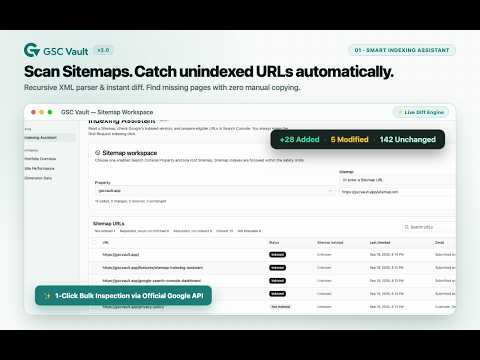
Get your pages indexed on Google faster and track Search Console performance. Published new pages and submitted your Sitemap, but Google is still not indexing them? Tired of manually copying URLs one by one into Search Console to inspect their status? GSC Vault is an all-in-one Google Search Console assistant designed for indie hackers, SEO professionals, content publishers, and site owners. It automatically scans your Sitemaps, identifies unindexed URLs and technical blockers, assists you through Google's Request Indexing workflow, and backs up your complete performance history beyond Google's 16-month limit. WHY YOU'LL LOVE IT 🧭 Smart Indexing Assistant • Scan Sitemap XML & Sitemap Indexes: Recursively inspects your submitted or custom Sitemaps (including gzip archives) and detects new, modified, or removed URLs. • Check Google index status: Inspect URLs via Google Search Console to see which are indexed, crawled but not indexed, discovered but not indexed, or blocked by canonical/noindex tags. • Streamlined Request Indexing: Prepares eligible URLs and opens the Search Console inspection route directly. You review and click the final Request Indexing button—100% compliant with Google's terms. • Follow-up tracking: Records submission timestamps and schedules rechecks so you know exactly when URLs get indexed. 📊 Multi-Property SEO Dashboard • All sites in one place: Compare clicks, impressions, CTR, and average position across multiple Search Console properties side-by-side. • Spot opportunities & drops fast: Automatically surfaces biggest winners and losers, pages losing clicks, CTR issues, and ranking changes. • Detailed drill-down: Explore performance by query, page, country, and device, plus single-page deep dives and Ahrefs Domain Rating (DR) tracking. 🗄️ Permanent History & Drive Backup • Beyond 16 months: Google Search Console only stores 16 months of data. GSC Vault automatically preserves your daily finalized data forever. • Your own Google Drive: Backup files stay in your personal Drive under files created only by the extension. No external database, no third-party server lock-in. • Fast & incremental: Daily background sync backs up only new finalized dates; existing data is never re-downloaded. ALSO INCLUDED 🔗 Search Console shortcuts — keep GSC Vault within reach while you work, with one-click sync and analysis actions beside Search Console. 🌍 Key dimensions — query, page, country, and device. ⏰ Set-and-forget — a daily sync runs automatically at the time you choose. 📤 Export anytime — download analysis views as CSV. 🌙 Polished UI — light and dark themes, available in English and Simplified Chinese. PRIVACY FIRST & GOOGLE COMPLIANT • 100% Google Compliant: GSC Vault never bypasses CAPTCHAs, automated request limits, or quotas. You make the final request click in Search Console yourself. • Local storage first: Sitemap URLs, page lists, URL Inspection results, and submission records stay safely in your browser's local IndexedDB. • Privacy-first Google Drive: The extension uses the restrictive drive.file scope to access only files it creates. Your SEO data is never sent to GSC Vault servers. • Safe host permissions: Requests optional host permissions only for the exact origin of your Sitemaps without sending cookies. • Anonymous telemetry: Only basic usage lifecycle events (no URLs, queries, tokens, or report data) are sent to Google Analytics 4. PRICING • Free — back up, analyze, and inspect up to 3 Search Console properties. • Pro — up to 10 Search Console properties for a US$19 one-time purchase. • Unlimited — no property limit for a US$59 one-time purchase. • Pay once, use forever. No monthly subscriptions. Paid licenses can be activated on up to 3 devices. GETTING STARTED 1. Install and open GSC Vault. 2. Authorize Google access (Search Console + Drive). 3. Open Indexing Assistant, select a property and Sitemap, and scan for unindexed URLs immediately! 4. Turn on scheduled sync to preserve your performance data and track site trends daily. Questions or feedback? Email support@gscvault.app — we read every message.
0 out of 5No ratings
Details
- Version2.6.0
- UpdatedOctober 3, 2026
- FeaturesOffers in-app purchases
- Size1.32MiB
- Languages2 languages
- DeveloperWebsite
Email
service@wossoft.cn - Non-traderThis developer has not identified itself as a trader. For consumers in the European Union, please note that consumer rights do not apply to contracts between you and this developer.
Privacy

GSC Vault – Google Indexing & SEO Assistant has disclosed the following information regarding the collection and usage of your data. More detailed information can be found in the developer's privacy policy.
GSC Vault – Google Indexing & SEO Assistant handles the following:
This developer declares that your data is
- Not being sold to third parties, outside of the approved use cases
- Not being used or transferred for purposes that are unrelated to the item's core functionality
- Not being used or transferred to determine creditworthiness or for lending purposes
Support
For help with questions, suggestions, or problems, please open this page on your desktop browser