

GSC Guardian
31 avis
)
Présentation
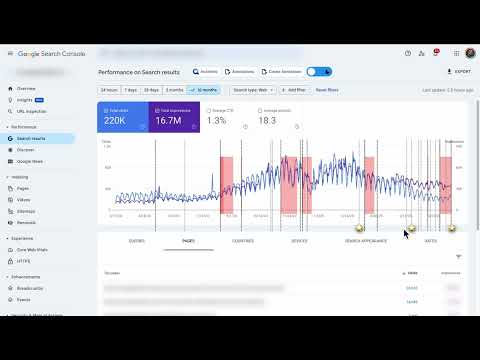
Stay on top of your website's health. Check for incidents in your Google Search Console data with a simple graph.
GSC Guardian 2.10 - Enhanced Google Search Console with Visual Algorithm Tracking 🔒 Security Verified: This extension has been independently reviewed for security to ensure that your data is not being uploaded to any unauthorized third parties: https://manus.im/share/VTfoAgDalRZmVeBU7ePuX2?replay=1 New: Bulk CSV Import - Upload historical annotations and migrate data efficiently ⭐ Trusted by 15,000+ SEO professionals worldwide 🏆 US Search Awards - Best Search Software Finalist ⭐ Please support us with a rating if GSC Guardian helps your workflow! ⭐ ━━━━━━━━━━━━ WHAT'S NEW IN 2.10 ━━━━━━━━━━━━ SECURITY ENHANCEMENTS • Complete security audit and code review completed • Enhanced security measures with independent verification • Public security transparency implemented for all future releases • Streamlined codebase for improved performance and reliability BULK ANNOTATION IMPORT • Upload CSV files containing hundreds of annotations at once • Preview annotations before importing to ensure accuracy • Download our CSV template to get started immediately • Ideal for migrating historical data or team handovers ENHANCED USER EXPERIENCE • Status messages now auto-hide for a cleaner interface • Annotations are filtered by Search Console property • New "Show All Resources" option for multi-property views • Improved visual hierarchy with dashed annotation lines JULY 2025 STABILITY UPDATE • Fixed compatibility issues with recent Google Search Console changes • Resolved date range switching bugs • Improved annotation property association ━━━━━━━━━━━━ KEY FEATURES & BENEFITS ━━━━━━━━━━━━ ALGORITHM UPDATE VISUALIZATION See Google's algorithm updates as visual overlays on your traffic graphs. Instantly understand if traffic changes correlate with known updates. COMPREHENSIVE ANNOTATION SYSTEM • Add context to traffic changes with timestamped notes • Import/export annotations for team collaboration • Search and filter annotations by date or keyword • Maintain historical records of site changes and optimizations DARK MODE Reduce eye strain during extended analysis sessions with a carefully designed dark theme. MULTI-LANGUAGE SUPPORT Available in 9 languages: English, Spanish, Dutch, French, Portuguese, German, Italian, Japanese, and Russian. DATA PORTABILITY Export all annotations and incidents to CSV or Google Sheets for reporting, backup, or migration purposes. ━━━━━━━━━━━━ REAL-WORLD USE CASES ━━━━━━━━━━━━ FOR SEO & MARMETING AGENCIES • Track client site changes across multiple properties • Document optimization efforts with timestamped annotations • Export visual reports showing algorithm impacts • Onboard new team members with historical context via CSV import FOR IN-HOUSE SEO & MARKETING TEAMS • Correlate development releases with traffic changes • Maintain audit trails of SEO implementations • Share insights across departments with exportable data • Track seasonal patterns with historical annotations FOR WEBSITE OWNERS • Understand traffic fluctuations in context • Document when content was published or updated • Track marketing campaign launches against organic performance • Build institutional knowledge about site performance FOR SEO CONSULTANTS • Quickly assess algorithm impact during site audits • Import client annotations for comprehensive analysis • Generate visual reports for client presentations • Maintain detailed records across multiple client projects ━━━━━━━━━━━━ HOW IT WORKS ━━━━━━━━━━━━ 1. Install the extension from Chrome Web Store 2. Navigate to Google Search Console 3. Algorithm updates automatically appear on performance graphs 4. Click any date to add an annotation 5. Use import/export features for bulk operations ━━━━━━━━━━━━ PRACTICAL BENEFITS ━━━━━━━━━━━━ SAVE TIME • No manual cross-referencing of algorithm updates • Bulk import eliminates repetitive data entry • Quick visual identification of impacted periods IMPROVE ANALYSIS • See patterns between updates and performance • Maintain comprehensive historical context • Make data-driven decisions with complete information ENHANCE COLLABORATION • Share annotations across team members • Standardize tracking across all properties • Build institutional knowledge that persists PROFESSIONAL REPORTING • Export annotated data for client presentations • Create visual timelines of SEO efforts • Document ROI of optimization work ━━━━━━━━━━━━ COMING SOON: GSC GUARDIAN PRO ━━━━━━━━ • API integrations with project management tools • Automated annotation rules • Multi-account management dashboard • Advanced filtering and analytics ━━━━━━━━━━━━ SUPPORT & PRIVACY ━━━━━━━━━━━━ • Actively maintained with regular updates • Responsive support team • Your data remains within Google's ecosystem • No external servers or data collection • Independent security verification with public audit available • Open to feature requests from the community ━━━━━━━━━━━━━━━━━━━━━━━━━━━━━━━━━━ Created by NODE & LINK - Enterprise SEO Solutions Install GSC Guardian to add powerful visualization and annotation capabilities to Google Search Console. Questions or feedback? We're here to help make your SEO workflow more efficient.
4,2 sur 531 avis
Détails
- Version2.10
- Dernière mise à jour6 octobre 2025
- Proposé parnodeandlink
- Taille1.84MiB
- LanguesEnglish (United States)
- Développeur
E-mail
hello@nodeandlink.com - Non-professionnelCe développeur ne s'est pas identifié comme professionnel. Pour les consommateurs de l'Union européenne, veuillez noter qu'il est possible que les droits des consommateurs ne s'appliquent pas aux contrats entre vous et ce développeur.
Confidentialité

Ce développeur déclare que vos données :
- Ne seront pas vendues à des tiers en dehors des cas d'utilisation approuvés.
- Ne seront ni utilisées ni transférées à des fins sans rapport avec la fonctionnalité de base de l'article.
- Ne seront ni utilisées ni transférées pour déterminer votre solvabilité ou en vue de vous proposer un prêt.
Assistance
Pour obtenir de l'aide concernant des questions, des suggestions ou des problèmes, consultez le site d'assistance du développeur.