


Overview
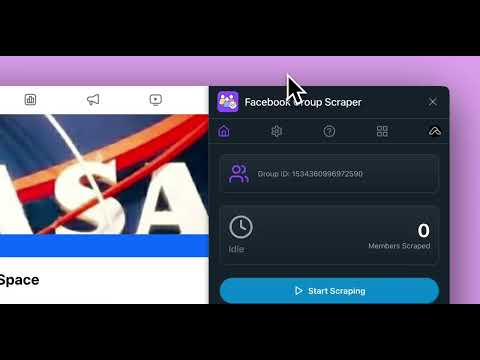
FB Group Scraper helps you Scrape Facebook Group members and export them into CSV/JSON/Excel file.
🚀 FB Group Scraper – Export Facebook™ Group Members to CSV | Lead Generation & Data Extraction Need a fast and reliable way to collect member data from Facebook™ groups? FB Group Scraper helps you export member information from Facebook™ groups you belong to into CSV format with just a few clicks. Whether you’re a marketer, recruiter, sales professional, researcher, agency, or business owner, this extension makes it easy to build targeted lead lists, analyze communities, and organize member data for outreach and research. Extract up to 3,000 Facebook™ group members and export everything into a clean CSV file that’s ready for Excel, Google Sheets, Airtable, CRMs, and other business tools. ✨ Why Choose FB Group Scraper? ✅ Export Facebook™ group members in seconds ✅ Extract up to 3,000 members per export ✅ Download member data as CSV ✅ Simple one-click workflow ✅ No technical skills required ✅ Perfect for lead generation, recruiting, community research, and networking 📦 What Information Can You Export? FB Group Scraper collects valuable publicly available member information, including: 🆔 User ID 👤 Full Name 🔗 Facebook™ Profile URL 🖼️ Profile Picture 📝 Biography (Bio) ✅ Verification Status 🧾 Group ID 👥 Group Member List The exported CSV can be easily imported into Excel, Google Sheets, CRM platforms, databases, or your own internal workflows. 🚀 How to Export Facebook™ Group Members Getting started takes less than a minute. 1️⃣ Open Facebook™ Sign in to your Facebook™ account. 2️⃣ Visit a Group Open any Facebook™ group that you have access to. 3️⃣ Launch FB Group Scraper Click the extension icon from your Chrome toolbar. 4️⃣ Start Scraping Click “Start” to begin collecting group member information. 5️⃣ Export Your Data Once the extraction is complete, click “Export Members” to download your CSV file. That’s it! Your data is immediately ready for Excel, Google Sheets, CRM software, marketing platforms, or further analysis. ⚡ Fast & Efficient FB Group Scraper begins collecting data immediately after you start. Extraction speed depends on: 📌 Number of members in the group 📌 Your internet connection 📌 Facebook™ loading speed Most exports finish within just a few moments. 💎 Upgrade to Pro Unlock the full power of FB Group Scraper with Pro. ⭐ Unlimited member exports ⭐ Priority customer support ⭐ Faster workflow for power users Perfect for agencies, recruiters, marketers, researchers, and professionals who regularly work with Facebook™ groups. 🔒 Privacy & Security Your data extraction runs directly from your browser. No complicated setup. No coding required. Simply install the extension, open a Facebook™ group, and export member information with a few clicks. ⚠️ Disclaimer Facebook™ is a registered trademark of Meta Platforms, Inc. FB Group Scraper is an independent third-party tool and is not affiliated with, endorsed by, sponsored by, or associated with Meta Platforms, Inc. or Facebook™. Start exporting Facebook™ group members today and save countless hours collecting valuable community data for lead generation, research, recruiting, and business growth.
5 out of 51 rating
Details
- Version1.7.0
- UpdatedOctober 9, 2026
- Size327KiB
- Languages9 languages
- DeveloperWebsite
Email
voicehop@gmail.com - Non-traderThis developer has not identified itself as a trader. For consumers in the European Union, please note that consumer rights do not apply to contracts between you and this developer.
Privacy

Group Scraper has disclosed the following information regarding the collection and usage of your data. More detailed information can be found in the developer's privacy policy.
Group Scraper handles the following:
This developer declares that your data is
- Not being sold to third parties, outside of the approved use cases
- Not being used or transferred for purposes that are unrelated to the item's core functionality
- Not being used or transferred to determine creditworthiness or for lending purposes
Support
For help with questions, suggestions, or problems, visit the developer's support site