

Gromming: AI LinkedIn Comment & Reply Writer

Overview
AI-powered LinkedIn comment & reply generator. Instantly write authentic, engaging responses and grow your professional network.
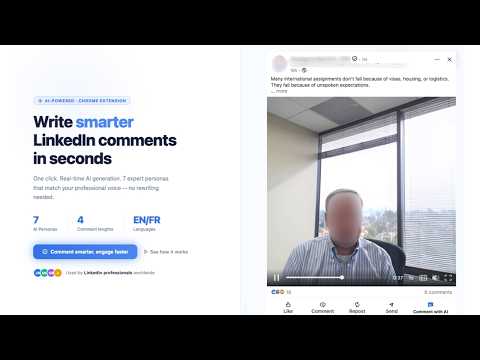
🤔 WHAT IS GROMMING? Gromming is a Chrome extension that injects an AI writing assistant directly into LinkedIn. It adds a "Comment with AI" button to every post and a "Reply with AI" button next to every comment — so you can generate thoughtful, on-brand responses without leaving the feed. 𝐍𝐨 𝐜𝐨𝐩𝐲-𝐩𝐚𝐬𝐭𝐢𝐧𝐠. 𝐍𝐨 𝐬𝐰𝐢𝐭𝐜𝐡𝐢𝐧𝐠 𝐭𝐚𝐛𝐬. 𝐉𝐮𝐬𝐭 𝐜𝐥𝐢𝐜𝐤, 𝐠𝐞𝐧𝐞𝐫𝐚𝐭𝐞, 𝐚𝐧𝐝 𝐩𝐨𝐬𝐭. 🎯 WHO IS IT FOR? 👔 Founders and executives who want to stay visible on LinkedIn without spending an hour a day writing comments. 💼 Sales professionals who need to engage with prospects' content consistently. 🔍 Recruiters building their personal brand in competitive talent markets. 📣 Marketers and content creators who want to drive engagement across their network. ⏱️ Anyone who finds writing LinkedIn comments time-consuming or mentally draining. ⚡ KEY FEATURES 💬 AI-Powered LinkedIn Comment Generator Gromming reads the full post content, understands the context, and generates a relevant, human-sounding comment — not a generic "Great post!" filler. Every comment is tailored to the post it responds to. ↩️ AI Reply Writer for LinkedIn Comments Reply directly to individual comments with AI. Gromming extracts the comment author's name and text, combines it with the parent post context, and streams a personalized reply straight into the reply box. ⚡ Real-Time Streaming Generated text streams into LinkedIn's comment box word by word — just like typing, but instant. No lag, no paste, no formatting issues. 🎭 Multiple AI Personas Choose from several writing personas to match your voice and goals: 📊 Analyst – data-driven, insightful 🔥 Motivator – energetic, encouraging 🙏 Grateful – warm, appreciative 😄 Comedian – witty, light-hearted 🧐 Curious – question-led, thought-provoking 🎯 Tactical Questioner – strategic follow-up questions 🏆 Quick Win Provider – actionable, practical 📏 Adjustable Comment Length Set your preferred comment length — short punchy responses or detailed, long-form engagement. Your preference is saved automatically. 🌐 Works on Feed and Post Pages Gromming injects seamlessly on the LinkedIn main feed, individual post pages, and company and profile pages. 🔒 Secure Authentication Powered by Clerk. Your LinkedIn session is never touched — Gromming authenticates with your Gromming account separately and securely. 🚀 HOW IT WORKS 1️⃣ Install the Gromming Chrome extension from the Chrome Web Store. 2️⃣ Sign in to your Gromming account to get started. 3️⃣ Browse LinkedIn as you normally would. 4️⃣ Click "Comment with AI" on any post — or "Reply with AI" on any comment. 5️⃣ Watch the AI write your comment directly into the text box. 6️⃣ Edit if needed, then post. No prompts to write. No tabs to switch. No copy-paste. 💬 COMMENT WITH AI Click the "Comment with AI" button on any LinkedIn post. Gromming reads the full post, picks the right tone based on your selected persona, and streams a relevant, human-sounding comment straight into the text box. ↩️ REPLY WITH AI See a comment worth engaging with? Hit "Reply with AI" to open the reply box and generate a personalized response that references the commenter by name and addresses their specific point. 🎭 MULTIPLE PERSONAS Choose how you sound: Analyst, Motivator, Grateful, Comedian, Curious, Tactical Questioner, or Quick Win Provider. Switch personas anytime from the extension sidebar. ⚡ REAL-TIME STREAMING Text streams in word-by-word, just like typing. Edit anything before you post. 🌐 WORKS EVERYWHERE ON LINKEDIN Main feed, individual post pages, company pages — Gromming injects the AI buttons on every supported LinkedIn page automatically. 🔒 SECURE AND PRIVATE Gromming never reads your messages or personal data. It only processes the public post or comment content you choose to reply to. 🚀 HOW TO GET STARTED 1️⃣ Install the extension. 2️⃣ Sign in or create a Gromming account at gromming.com. 3️⃣ Open LinkedIn and start engaging with AI. 🔗 LINKS 🌍 Website: https://gromming.com 📧 Support: support@gromming.com
5 out of 52 ratings
Details
- Version0.1.8
- UpdatedApril 6, 2026
- FeaturesOffers in-app purchases
- Size1.72MiB
- LanguagesEnglish (United States)
- Developermohssine serrajiWebsite
2 Impasse du Télégraphe Évry-Courcouronnes 91000 FREmail
superfox.contact@gmail.comPhone
+33 6 58 74 89 85 - TraderThis developer has identified itself as a trader per the definition from the European Union and committed to only offer products or services that comply with EU laws.
Privacy

Gromming: AI LinkedIn Comment & Reply Writer has disclosed the following information regarding the collection and usage of your data. More detailed information can be found in the developer's privacy policy.
Gromming: AI LinkedIn Comment & Reply Writer handles the following:
This developer declares that your data is
- Not being sold to third parties, outside of the approved use cases
- Not being used or transferred for purposes that are unrelated to the item's core functionality
- Not being used or transferred to determine creditworthiness or for lending purposes
Support
For help with questions, suggestions, or problems, visit the developer's support site