


Overview
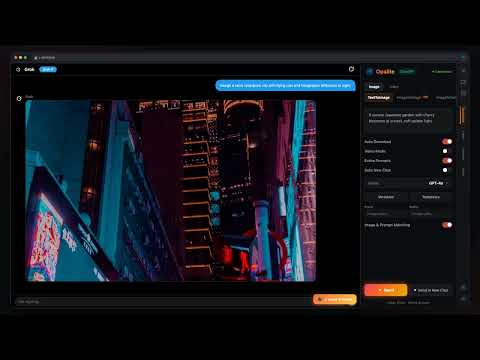
Batch-create and save AI videos and images from Grok. Auto-save, prompt tools, upscale, optional library sync.
Grok Suite by Opalite — batch-create and save every video and image you make with Grok. WHAT IT DOES Supercharge your creative workflow on Grok. Batch-send prompts, auto-save results, manage generation tasks, and organize everything in one place — free. KEY FEATURES • Batch Prompt Sending: Queue up multiple prompts and send them automatically. Stop copying and pasting one at a time — let the extension handle it while you focus on creating. • Auto-Save: Every video and image saves to your device as it's generated. No more right-clicking or hunting through your browser history. • Prompt Templates: Build reusable prompt templates with variables, prefixes, and suffixes. Generate dozens of variations from a single template. • Task Queue: Full task management with automatic queuing, adjustable execution order, and the ability to add or remove tasks anytime. • Image-to-Video & Image-to-Image: Feed existing images back into Grok to create new videos or image variations — supports single or batch input. • AI Upscaling: Enhance resolution up to 4× with built-in AI upscaler. • Background Removal: Strip backgrounds from images automatically. • Watermark Removal: Clean Grok watermarks from saved videos and images. • Cloud Library: Save everything to your Opalite cloud for searchable, organized storage that syncs across all your devices. • Easy Sharing: Share videos and images directly from your dashboard. GROK'S STRENGTHS Grok is a powerhouse for AI video and image generation — free, fast, and high-volume. Grok Suite lets you take full advantage by automating the entire create-and-save workflow. HOW IT WORKS 1. Install the extension — start using immediately, no signup needed 2. Generate on Grok — use batch prompts or create as usual 3. Videos and images auto-save to your device as they're created 4. Sign in anytime for cloud storage, AI upscaling, background removal, and sharing WHY GROK SUITE Most features are completely free — no trial, no credit card, no catch. Batch prompts, auto-save, templates, and task management all work out of the box with no account. Want cloud storage, AI upscaling, or watermark removal? Sign in to unlock pro tools with your Opalite account. Your AI creations deserve better than scattered browser tabs and lost generations. Grok Suite turns Grok into a full creative studio — batch-create, auto-save, enhance, and organize everything you make. Visit opalitestudios.com to learn more.
5 out of 53 ratings
Details
- Version1.3.20
- UpdatedSeptember 23, 2026
- Size10.33MiB
- LanguagesEnglish
- DeveloperWebsite
Email
lipodipo33@gmail.com - Non-traderThis developer has not identified itself as a trader. For consumers in the European Union, please note that consumer rights do not apply to contracts between you and this developer.
Privacy

Grok Suite has disclosed the following information regarding the collection and usage of your data. More detailed information can be found in the developer's privacy policy.
Grok Suite handles the following:
This developer declares that your data is
- Not being sold to third parties, outside of the approved use cases
- Not being used or transferred for purposes that are unrelated to the item's core functionality
- Not being used or transferred to determine creditworthiness or for lending purposes
Support
For help with questions, suggestions, or problems, please open this page on your desktop browser