

Grok Media Downloader

Overview
Batch download, auto-generate videos, and manage your entire Grok AI media library — all in one extension.
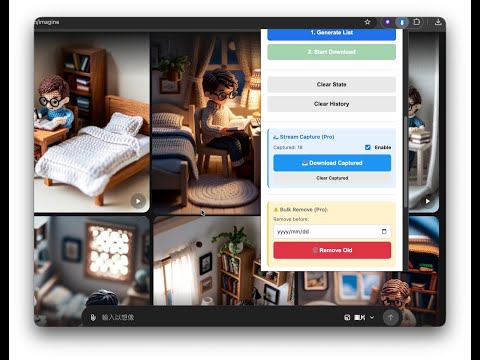
Batch download Grok images & videos from X.ai! The most stable, professional media manager for AI creators. Optimize your workflow with Full Library Backup, New Tag Collections, 1080p Upscaling, Custom Filenames, Auto-Video Gen, and Story Mode. Built for speed, privacy, and zero browser crashes. Grok Media Downloader is the #1 professional toolkit for X.ai (Grok) power users. Whether you're a prompt engineer archiving thousands of AI generations or a filmmaker building cinematic stories, this extension turns your Grok account into a high-performance, structured media library. 🚀 WHAT'S NEW IN VERSION 2.5.5 - THE TAG & COLLECTION SYNC UPDATE! Grok has updated its underlying taxonomy from legacy folders to the new Collections system. Version 2.5.5 delivers an under-the-hood engine overhaul to ensure 100% accurate synchronization with all your newest Grok tags and metadata. 🏷️ Full Tag & Collection Engine Overhaul: Complete Tag Discovery: Directly queries Grok's new Collections API (/rest/collections). Newly created tags/collections now sync instantly in your tag list upon refresh. Zero Missing Media: Fixes legacy API drops (where older endpoints reported 0 or incomplete items). Retrieves 100% of tagged assets. Prompt-Based Filenames for Tags: Tag downloads now fully support custom prompt-based naming templates {Prompt} (videos automatically inherit the parent image's generation prompt). Seamless Fallback: Maintains graceful backward compatibility with legacy folder endpoints for uninterrupted workflow. 🔧 Diagnostic Logging for HD Video Upscaling: Added detailed server-response telemetry for HD/1080p batch upscaling requests. This enables rapid diagnostics and precision tracking for high-volume video processing. 🌟 WHY CHOOSE GROK MEDIA DOWNLOADER? 📥 Pro-Grade Batch Downloading & Organization 3 Flexible Download Sources: Switch seamlessly between Full Library (/rest/assets), Tags/Collections, or Legacy Favorites. Smart Folder Engine: Automatically organize downloads into clean sub-folders named by conversation (YYYYMMDD_Prompt_ID) or custom tags. Custom Naming Engine: Build dynamic filenames with rich metadata tags like {Date}, {Time}, {Prompt}, {ID}, and {Seed}. OOM-Safe Architecture: Effortlessly processes massive libraries (15,000+ items) with zero memory leaks, browser freezes, or tab crashes. 🤖 Video Gen Queue & 1080p Batch Upscaler Set-and-Forget Video Automation: Select multiple image generations and batch-generate videos (Normal, Fun, Spicy) in the background. Library-Wide 1080p Upscaling: Upgrade your media collection from SD/720p up to pristine 1080p with "Upward-Only" quality memory. Smart 429 Rate-Limit Handling: Automatically detects X.ai rate limits and gracefully pauses/resumes requests without dropping queue items. 🎬 Story Mode: Your In-Browser AI Video Studio Client-Side Video Stitching: Merge multiple Grok video clips into seamless MP4 sequences using WebAssembly (Wasm). 100% private with no external server uploads. Frame Lock & Trim: Match first and last frames to eliminate visual stutter and achieve fluid cinematic transitions. 📂 Metadata Preservation & Asset Protection JSON Metadata Export: Save complete prompt texts, seed parameters, sampler data, and resolution details side-by-side with your downloads. Real-Time Stream Capture: Automatically archive iterative generation variations as you prompt live on Grok. 💎 FREE vs. PRO FEATURES ✨ Core Features (Free) Smart List Generation & Batch Image Downloading. Tag & Collection scanning support. Privacy First: 100% local execution within your browser. 🔥 PRO Features (Lifetime Access) Full Library Backup: Download every generated image and video across your entire conversation history. Batch 1080p & HD Video Downloader: Save ultra-high-definition MP4s in bulk. Unlimited Automated Video Gen Queue: Queue background video generation without limits. Advanced Folder Routing: Group by conversation threads, custom Tag Collections, and customizable prompt naming templates. Pro Story Studio: Advanced Frame Lock, Trim-on-Export, and complete Metadata Database Import/Export. 📜 RECENT VERSION HISTORY v2.5.2: Upgraded to Grok's new Collections API (fixes missing/new tags), added Prompt-based naming for Tag downloads, and introduced HD upscale diagnostic telemetry. v2.5.0: Ground-up architecture upgrade for Grok's Conversation + Asset backend (/rest/assets), full 1080p batch upscaling, and persistent Quality Memory. v2.3.6: Configurable request timeouts (up to 600s), partial scan auto-recovery, and early-stop date filtering. v2.3.0: Introduced Story Mode cinematic stitching and Frame Lock trimming. 🔒 Privacy Policy: We respect creative privacy. All parsing, processing, and media downloads occur 100% locally inside your browser session. We do NOT store, monitor, or transmit your prompts, images, videos, or browsing activities to external servers. Turn your Grok feed into an organized, automated creative workstation today! 📖 Official Guides & Documentation: https://grokmedia.kario-studio.com/
4.1 out of 527 ratings
Details
- Version2.5.6
- UpdatedSeptember 14, 2026
- Size8.81MiB
- Languages6 languages
- DeveloperWebsite
Email
support@kario-studio.com - Non-traderThis developer has not identified itself as a trader. For consumers in the European Union, please note that consumer rights do not apply to contracts between you and this developer.
Privacy

This developer declares that your data is
- Not being sold to third parties, outside of the approved use cases
- Not being used or transferred for purposes that are unrelated to the item's core functionality
- Not being used or transferred to determine creditworthiness or for lending purposes
Support
For help with questions, suggestions, or problems, please open this page on your desktop browser