

Grok Automation — Video & Auto-Download | PandaVid.ai
1 rating
)
Overview
Grok automation for Grok Imagine on grok.com: batch AI videos & images, storyboard, chain scenes, auto-download. By PandaVid.ai.
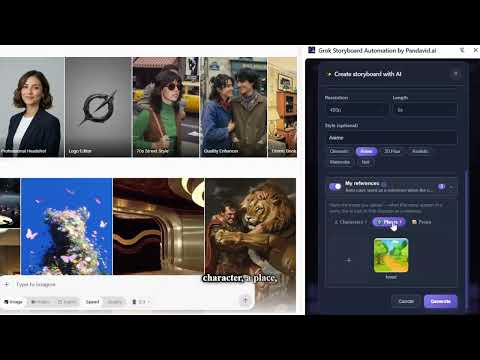
Grok Imagine Automation turns grok.com into a batch AI video & image studio. Plan a whole storyboard of shots once, then let the extension generate and auto-download them for you on Grok Imagine — no more babysitting each generation or saving files by hand. WHAT IT DOES • Batch automation for Grok Imagine — queue multiple shots (text-to-video, image-to-video, text-to-image) and auto-run the entire storyboard on grok.com. • Auto-download — every generated video and image is captured and saved automatically, all in one place. • Scene chaining — continue from the last frame of the previous shot for a smooth, flowing sequence (great for longer clips). • Per-shot control — quality (480p/720p), length (6s/10s), aspect ratio, and reference images for each shot. • AI script-to-scenes (Pro) — paste a story or script and Grok splits it into ready-to-run shot prompts automatically. • Consistent characters — save a character once; whenever you name it in your story, it looks the same in every scene. • Multi-language interface (15 languages). WHY USE IT Generating a sequence on grok.com by hand means submitting every prompt, waiting, and downloading each result one by one. This extension does the whole batch for you — plan it, hit Run, and come back to finished videos and images ready to download. HOW IT WORKS The extension automates the Grok Imagine interface in your own browser. Your prompts, reference images, and the videos and images Grok generates stay between your browser and grok.com — they are never sent to our servers. PRO (optional subscription) The AI script-to-scenes feature is a paid add-on ($1.99/week, $4.99/month, $34.99/year). No account or sign-up required — your plan is tied to an anonymous install ID, and you receive a license key for use on other devices. Payments are handled by Stripe on pandavid.ai. PRIVACY We never collect your name, email, browsing history, prompts, images, or generated media. The only data sent to our servers is: (1) the text script you choose to send for AI scene-splitting, (2) an anonymous install ID for license checks and run-planning signals (no prompts/images), and (3) anonymous error reports — machine error codes, the step name, and a short excerpt of grok.com's on-screen error message with links stripped (no prompts, images, URLs, or personal data) — so we can detect when grok.com UI changes break the automation. Full privacy policy: https://pandavid.ai/privacy-policy This is an independent tool and is not affiliated with, endorsed by, or sponsored by xAI or Grok.
5 out of 51 rating
Details
- Version1.16.0
- UpdatedSeptember 1, 2026
- Offered bycontact.pandavid
- Size381KiB
- LanguagesEnglish
- DeveloperSipos Ottó
Leibstück mária utca 20 Győr 9026 HUEmail
contact.pandavid@gmail.comPhone
+36 20 212 9309 - TraderThis developer has identified itself as a trader per the definition from the European Union and committed to only offer products or services that comply with EU laws.
Privacy

Grok Automation — Video & Auto-Download | PandaVid.ai has disclosed the following information regarding the collection and usage of your data. More detailed information can be found in the developer's privacy policy.
Grok Automation — Video & Auto-Download | PandaVid.ai handles the following:
This developer declares that your data is
- Not being sold to third parties, outside of the approved use cases
- Not being used or transferred for purposes that are unrelated to the item's core functionality
- Not being used or transferred to determine creditworthiness or for lending purposes
Support
For help with questions, suggestions, or problems, please open this page on your desktop browser