

Grid Lens

Overview
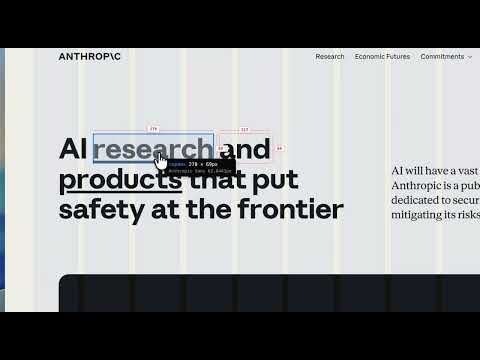
Inspect any webpage's visual grid, typography, and colors. Export design tokens as Markdown.
Grid Lens is a design inspection tool for the browser. Pick any element, measure dimensions, extract typography and color tokens, and export production-ready CSS code. Features: • Pixel Grid Overlay — Toggle a configurable grid (4px, 8px, 16px) to check alignment. Baseline grid and 12-column layout modes included. • Element Boxes — Visualize every element's bounding box with depth-based outlines. • Inspect Mode — Hover any element to see its tag, dimensions (width × height), font info, and padding in real-time. • Rulers — Pixel rulers along the top and left edges, with tick marks every 10px and labels every 50px. • Select & Measure — Click elements to annotate their dimensions with redline-style labels. Export an annotated screenshot with all measurements visible. • Pick → Code — Click any element to extract its original CSS rules directly from the page's stylesheets. Includes :hover, :focus, :active states, transitions, @keyframes animations, and CSS variables (var()). Falls back to computed styles when stylesheets are cross-origin. SVG elements export their attributes (fill, stroke, d, etc.). • Design System Snapshot — Extract the full design system from any page: typography scale with ratio detection, font families, color palette (text/background/accent split), CSS custom properties, spacing scale with base unit detection, border radius, box shadows, and layout max-width. Export as structured Markdown. • Day / Night Mode — Auto-switches based on time of day, or toggle manually. • Side Panel — Pin Grid Lens as a persistent panel alongside your browser. • Keyboard Shortcuts — Alt+G (grid), Alt+I (inspect), Alt+R (rulers). No popup needed. Privacy: Grid Lens runs entirely in your browser. No data is collected, no network requests are made. All processing is local.
0 out of 5No ratings
Details
- Version1.0.0
- UpdatedMay 3, 2026
- Offered bywentaozhong93
- Size30.96KiB
- LanguagesEnglish (United States)
- Developer
Email
wentmess@gmail.com - Non-traderThis developer has not identified itself as a trader. For consumers in the European Union, please note that consumer rights do not apply to contracts between you and this developer.
Privacy

This developer declares that your data is
- Not being sold to third parties, outside of the approved use cases
- Not being used or transferred for purposes that are unrelated to the item's core functionality
- Not being used or transferred to determine creditworthiness or for lending purposes
Support
For help with questions, suggestions, or problems, visit the developer's support site