

GrayScale Overlay
2 lượt xếp hạng
)
Tổng quan
Adds a grayscale overlay to any webpage
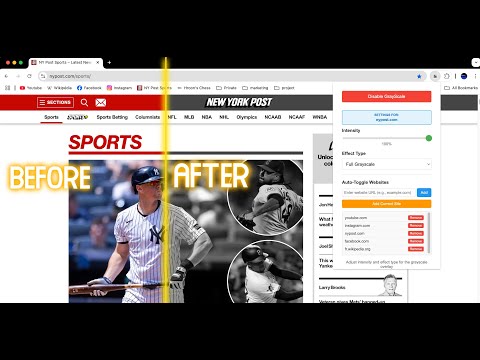
## **GrayScale Overlay – Clean Monochrome Browsing** ### 🌐 Description Bring clarity and calm to your web experience with **GrayScale Overlay** – a customizable Chrome extension that lets you apply grayscale filters to any website. Whether you're looking to reduce eye strain, focus better, or simply enjoy a distraction-free, minimalist interface, this extension has you covered. --- ### 🎯 **Key Features** #### ✅ Adjustable Grayscale Filter * Apply a grayscale overlay to any webpage without disrupting interactions. * Smooth, performance-friendly transitions. * Customizable intensity from 0% to 100%. #### 🎨 Multiple Visual Modes * **Desaturate** (soft and subtle) * **Grayscale** (true black-and-white) * **Luminosity** (high contrast) * **Color Dodge** (dramatic tones) #### 🌍 Auto-Toggle Per Website * Automatically activate grayscale on specific websites. * Works with subdomains (e.g., `www.reddit.com`, `old.reddit.com`, `m.reddit.com`). * One-click "Add Current Site" feature. #### 💡 Real-Time Controls * Instantly preview filter changes. * Use a slider to fine-tune intensity. * Choose visual modes from a dropdown menu. #### 💾 Persistent Settings * Saves your preferences across browser sessions. * Remembers websites and intensity levels. * Syncs settings across Chrome installations. #### 🧠 Per-Tab Intelligence * Each tab tracks its own grayscale state. * Seamless transitions between enabled and disabled tabs. #### 🧰 Easy-to-Use Interface * Clean, modern popup design. * Smart enable/disable buttons. * Fully responsive and intuitive. --- ### 👥 Ideal For: * Students and professionals who need fewer distractions. * Readers and researchers on text-heavy sites. * Users sensitive to color brightness or visual noise. * Minimalists who enjoy a clean, grayscale aesthetic. --- ### 🔒 Privacy & Permissions * **No data collection or tracking.** * Settings stored locally using Chrome Sync. * Requires only essential permissions: `activeTab`, `storage`. --- ### ⚙️ How to Use 1. Click the extension icon to toggle grayscale. 2. Adjust intensity and mode in real time. 3. Use “Add Current Site” to auto-enable on your favorite websites. 4. Manage your website list directly from the popup. --- ### ⚡ Performance * Lightweight and fast. * No impact on page load speed. * Built using modern, efficient CSS rendering (`mix-blend-mode`, `backdrop-filter`). --- ### 💬 Support Need help or have suggestions? Reach out via the support tab on the Chrome Web Store.
5/52 lượt xếp hạng
Chi tiết
- Phiên bản1.0
- Đã cập nhật10 tháng 7, 2025
- Kích thước31.3KiB
- Ngôn ngữEnglish
- Nhà phát triển
Email
harounmili@yahoo.ca - Người bán phi thương mạiNhà phát triển này không tự nhận mình là người bán. Đối với người tiêu dùng ở Liên minh Châu Âu, xin lưu ý rằng các quyền của người tiêu dùng không được áp dụng trong hợp đồng giữa bạn và nhà phát triển này.
Quyền riêng tư

GrayScale Overlay đã công bố thông tin sau đây liên quan đến việc thu thập và sử dụng dữ liệu của bạn. Bạn có thể xem thêm thông tin chi tiết trong privacy policy của nhà phát triển.
GrayScale Overlay xử lý dữ liệu sau:
Nhà phát triển này tuyên bố rằng dữ liệu của bạn
- Không được bán cho bên thứ ba, ngoài những trường hợp sử dụng đã được phê duyệt
- Không được sử dụng hoặc chuyển nhượng cho các mục đích không liên quan đến chức năng chính của mặt hàng
- Không được sử dụng hoặc chuyển nhượng để xác định khả năng thanh toán nợ hoặc phục vụ mục đích cho vay