


Overview
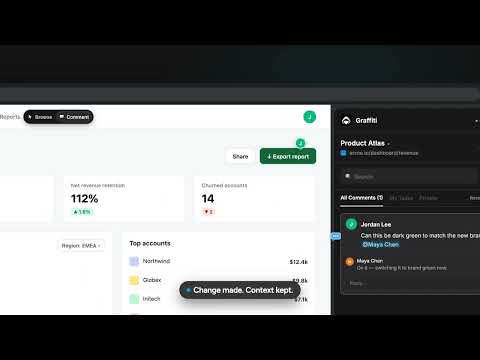
Annotate and comment on any website. Pin visual feedback and bug reports to the exact element, then @mention your team.
1.0.2 - Fixed could not decode image error Graffiti is a website feedback tool for teams. Annotate any webpage, pin comments to the exact button, chart or paragraph, and keep the whole conversation attached to the live site. No screenshots, no "wait, which button?" HOW IT WORKS 1. Click: select any element on screen. 2. Comment: say what you see. The thread remembers the URL, the element and everything said about it. 3. Mention: @ a colleague to pull them into the discussion. 4. Resolve: when the fix ships, close the thread. The full history stays attached. WHY TEAMS SWITCH FROM SCREENSHOTS - Visual feedback in context: notes pin to the element itself, not a stale image pasted into Slack. - Works on sites you don't own: production, staging builds, competitor pages. The site installs nothing. - Works on internal tools and logged-in dashboards you can already reach. Each reviewer needs their own access to the site. - One side panel: read, reply to and search every thread without switching tabs. - Shared team spaces: everything stays organised by URL. USE IT FOR - Design review and UX feedback, including design files viewed in the browser - Bug reporting and QA: engineers open the thread and see exactly what the tester saw - Copy edits and proofreading on landing pages and marketing campaigns - Client approvals on websites, web apps and dashboards - Web annotation for research, onboarding and internal documentation GETTING STARTED - Add Graffiti to Chrome and pin it to your toolbar. - Sign in with Google and create or join a team at mygraffiti.ai. - Open any site, click the Graffiti icon, and start marking it up.
0 out of 5No ratings
Details
- Version1.0.2
- UpdatedOctober 24, 2026
- Size252KiB
- LanguagesEnglish (United States)
- DeveloperWebsite
Email
hello@mygraffiti.ai - Non-traderThis developer has not identified itself as a trader. For consumers in the European Union, please note that consumer rights do not apply to contracts between you and this developer.
Privacy

Graffiti has disclosed the following information regarding the collection and usage of your data. More detailed information can be found in the developer's privacy policy.
Graffiti handles the following:
This developer declares that your data is
- Not being sold to third parties, outside of the approved use cases
- Not being used or transferred for purposes that are unrelated to the item's core functionality
- Not being used or transferred to determine creditworthiness or for lending purposes