

GradeShuttle – Move grades into your web gradebook

Overview
Move grades from Google Classroom and other learning apps into your web gradebook. Review every match. Student data stays local.
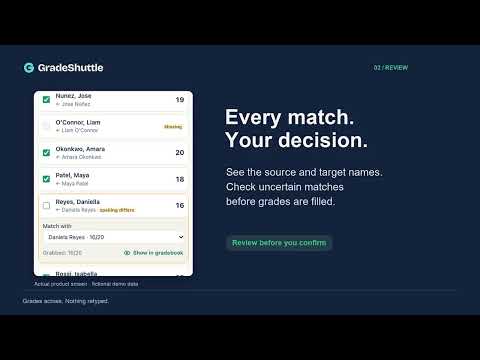
Stop retyping grades. GradeShuttle copies a column of scores from the page where your students did the work into your school's web gradebook. You check every match before anything is typed, and one click undoes the whole fill. HOW IT WORKS 1. Grab: open the page with your scores, press Grab in the side panel and click any grade in the column you want. GradeShuttle highlights the whole column and the names it will read before you click. 2. Fill: open your gradebook, press Fill and click any cell in the matching column. 3. Review: see every student, the name it was matched to and how (exact, name order, nickname, spelling, student ID), the grade already there and the new one. Matches GradeShuttle isn't sure about start unticked. You can change any match. 4. Confirm: GradeShuttle types the grades, checks each cell on the page and marks it filled, kept, skipped or unmatched. Check the highlights, then press Save in your gradebook. GradeShuttle never presses Save. Long classes: one press of Fill covers the whole column, including rows further down a long page and rows a gradebook only draws as you scroll. GradeShuttle scrolls the list itself, writes only rows it can see in full and puts the scroll position back. Rows it can't tell apart for certain (for example two students with the same name and no row numbers) are left empty and listed for you. BUILT TO PROTECT YOUR GRADEBOOK • Grades already in your gradebook are kept unless you choose to replace them. • Missing and Excused work is skipped and flagged by default, not typed as a zero. • Undo puts back every cell from the last fill. STUDENT DATA STAYS ON YOUR COMPUTER • No account and no sign-in. • The extension sends no student data to us or anyone else: no analytics, no tracking. • It reads a page only when you press Grab or Fill: the column you click and the student names on the same rows. • Grabbed names and grades are kept in Chrome's memory and erased when Chrome closes, when you press Clear, or after 60 minutes (you can choose 5 minutes to 4 hours). • Buying Pro happens on our website (gradeshuttle.com), which uses Stripe for payment. The website never receives student data. See the privacy policy for what the website and payment service handle. WHERE IT WORKS Web pages that list students in rows: tables, grids, long and scrolling lists, pages inside frames and click-to-edit gradebooks. It is designed for pages like Google Classroom, Canvas, Schoology, PowerSchool PowerTeacher Pro and Infinite Campus, but it has not yet been tested on those live platforms; we will post a list of platforms tested with real teacher accounts at gradeshuttle.com. For Google Sheets, Excel or a downloaded file, paste your scores or drop in a CSV. A class split across several pages is filled one page at a time. KEYBOARD Open GradeShuttle with Alt+Shift+G. You can change the shortcut at chrome://extensions/shortcuts. FREE FOREVER Grab, fill, review, undo, paste and CSV import, name matching and rounding. PRO: US$29 A YEAR A 7-day Pro trial is built in, with no card and no account. Pro adds points and percent conversion, rescaling and curves, letter grades, your own codes for Missing and Excused, Grab more (merge sections and make-ups), remembered name matches, clean-up rules and transfer receipts. Pay yearly, or pay once for one year. SCHOOLS AND DISTRICTS School and District licenses give every teacher Pro. IT teams can deploy GradeShuttle through Google Admin with an allowed-sites list and locked settings. Ask for our privacy and security pack. Please check that your school or district allows GradeShuttle before you use it with real student data. GradeShuttle is a product of RentMouse. It is not affiliated with or endorsed by Google, Instructure, PowerSchool, Infinite Campus or any other company or platform named here.
0 out of 5No ratings
Details
- Version1.1.0
- UpdatedOctober 14, 2026
- FeaturesOffers in-app purchases
- Offered byandreas.much
- Size120KiB
- LanguagesEnglish
- Developer
Email
andreas.much@gmail.com - Non-traderThis developer has not identified itself as a trader. For consumers in the European Union, please note that consumer rights do not apply to contracts between you and this developer.
Privacy

GradeShuttle – Move grades into your web gradebook has disclosed the following information regarding the collection and usage of your data. More detailed information can be found in the developer's privacy policy.
GradeShuttle – Move grades into your web gradebook handles the following:
This developer declares that your data is
- Not being sold to third parties, outside of the approved use cases
- Not being used or transferred for purposes that are unrelated to the item's core functionality
- Not being used or transferred to determine creditworthiness or for lending purposes
Support
For help with questions, suggestions, or problems, visit the developer's support site