

Grade Grabber

Համատեսք
Copy Grades from Google Classroom, Canvas and many others to Powerschool TAC, PowerTeacher, or Canvas
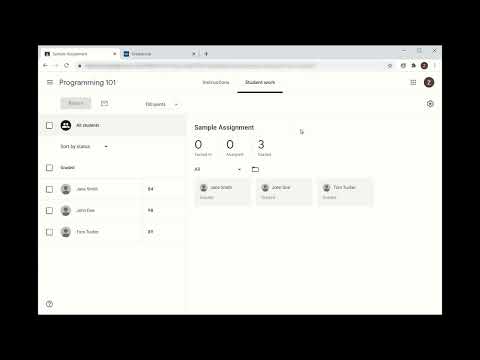
Copy grades from Google Classroom, Canvas, clipboard, Delta Math, MathSpace, McGraw Hill and Edpuzzle to Powerschool's eSchoolPLUS Teacher Access Center (TAC),PowerTeacher PRO or Canvas. Save hours manually transferring grades between programs. Grades copied to the clipboard from Excel or Google Sheets can also be grabbed by Grade Grabber and entered into your PowerSchool gradebook, as well as grades that are grabbed can be copied back to a spreadsheet. To grab grades from google classroom, simply open the assignment page, click the Grab button in the extension and the grades will be pulled from the classroom page and placed into storage. To enter into the TAC or PowerTeacher gradebook, click on a grade on the assignment column you want to use, and click the Enter button in the extension. The grades will be automatically matched on name and the grades entered into the gradebook. In situations where automatic name mapping does not work, Grade Grabber features a manual name mapping feature. If grade scales do not match between gradebooks, grades can be scaled to be correct before entering. Missing and late grades from Google Classroom can be marked in PowerTeacher PRO. A minimum grade override can also be set when grades are entered. Supports grabbing from Google Classroom, Canvas, Clipboard (spreadsheet), McGraw Hill, EdPuzzle, Mathspace, and Delta Math. Transfers to Teacher Access Center, Power Teacher Pro, Canvas and spreadsheet.
4,3/56 գնահատական
Մանրամասներ
- Տարբերակ1.2.16
- Թարմացված է25 հոկտեմբերի, 2025 թ.
- Չափս427KiB
- ԼեզուներEnglish (United States)
- ԾրագրավորողIdeal Technology SolutionsԿայք
10725 Coeburn Mountain Road Wise, VA 24293 USԷլփոստի հասցե
support@gradegrabber.netՀեռախոս
+1 276-219-7604 - ՎաճառողԱյս ծրագրավորողը հայտարարել է, որ հանդիսանում է վաճառող՝ համաձայն ԵՄ հատկորոշման, և պարտավորվել է առաջարկել միայն ԵՄ կանոնակարգերին համապատասխանող ապրանքներ և ծառայություններ։
Գաղտնիություն

Այս ծրագրավորողը պնդում է, որ ձեր տվյալները՝
- Օգտատերերի տվյալները չեն վաճառվում երրորդ կողմերի՝ բացառությամբ թույլատրված դեպքերի
- Չի օգտագործվում կամ փոխանցվում պրոդուկտի հիմնական գործառույթների հետ կապ չունեցող նպատակներով
- Չի օգտագործվում կամ փոխանցվում վարկունակությունը որոշելու կամ վարկավորման նպատակով