


Overview
Grab and download subtitles from any YouTube video with ease.
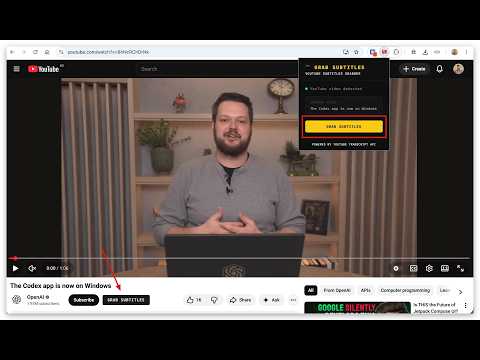
Grab YouTube Subtitles makes it easy to copy and download subtitles from any YouTube video, as long as subtitles are available. Displays subtitle timestamps and allows you to download them in TXT or SRT format. How to get start 1. Install extension by button “Add to Chrome” 2. Open any youtube video 3. Click button on panel of Video (Grab Subtitles button) 4. Download youtube subtitles Features Formats: SRT and TXT file. <br> ⬇️ Download YouTube subtitles <br> 📋 Copy YouTube caption to clipboard Who Is It For? Copy or Download subtitles from youtube for Creators, Translators, Language Learners, Students & Educators. Formats for downloading YouTube subs: SRT — Subtitle file with timestamps <br> TXT — Flexible plain text format You can contact developer via: - Email: rajankarmakar2@gmail.com - LinkedIn: https://www.linkedin.com/in/rajankarmakar24x7 - Website: https://rajankarmaker.com/contact
0 out of 5No ratings
Details
- Version1.0.0
- UpdatedMarch 30, 2026
- Size30.38KiB
- LanguagesEnglish (United States)
- DeveloperWebsite
Email
rajankarmakar2@gmail.com - Non-traderThis developer has not identified itself as a trader. For consumers in the European Union, please note that consumer rights do not apply to contracts between you and this developer.
Privacy

This developer declares that your data is
- Not being sold to third parties, outside of the approved use cases
- Not being used or transferred for purposes that are unrelated to the item's core functionality
- Not being used or transferred to determine creditworthiness or for lending purposes
Support
For help with questions, suggestions, or problems, visit the developer's support site