

AIExportHub: Save AI Chats to Notion, PDF & MD

Overview
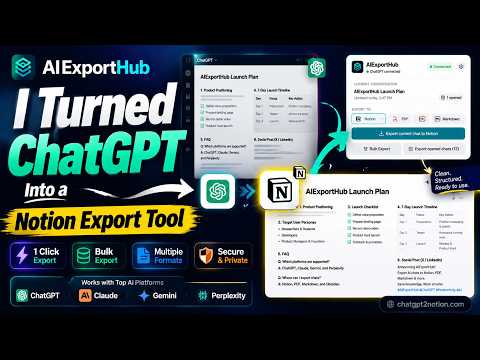
Bulk export ChatGPT, Claude, Gemini & Perplexity chats to Notion, Obsidian, Markdown (.md), or PDF. Backup AI history in one click.
AIExportHub: Bulk Export AI Chats to Notion, Markdown & PDF AIExportHub is an all-in-one AI chat exporter and backup tool. Effortlessly export, organize, and archive your conversations from leading AI platforms directly to your favorite knowledge management workspaces, local Markdown (.md) files, or formatted PDF documents. Stop manually copying and pasting prompts and responses. Whether you are building a searchable Second Brain, maintaining a personal knowledge base, or archiving research & coding threads, AIExportHub preserves your data with clean formatting in one click. ✨ SUPPORTED PLATFORMS & COLLECTIONS Export single chats, entire histories, or specialized workspaces: • ChatGPT: Standard chats, Custom GPTs, Projects, and archived threads • Claude: Conversations and Projects • Google Gemini: Standard chats, Pinned threads, and Spark / Gems • Perplexity: Library threads, Spaces, Collections, and Computer Tasks • Grok: Conversations and Projects 📂 FOUR POWERFUL EXPORT DESTINATIONS 1. Export to Notion (Cloud Sync) Build an organized, searchable knowledge base in your workspace: • Sync chats directly to any selected database • Automatically map structured metadata (timestamps, platform, URLs, tags) • Upload and embed generated images, attachments, and canvas documents • Smart deduplication: skip unchanged chats or overwrite updated conversations 2. Export to Obsidian & Markdown (.md) Generate clean, portable local files ready for your vault, Logseq, or Git repositories: • Include customizable YAML front matter (properties) for seamless PKM indexing • Download images and attachments locally with automatic relative link rewriting • Customize filename templates and local folder hierarchies • 100% local processing—no intermediate cloud storage required 3. Export to PDF Create polished, shareable documents for printing, client reporting, or offline reading: • Choose from multiple clean visual themes and page layouts • Preserve syntax-highlighted code blocks, tables, citations, and embedded images • Save associated attachments alongside your PDF documents ⚡ BUILT FOR POWER USERS & MASSIVE LIBRARIES • One-Click & Bulk Export: Save the currently active chat or batch-export thousands of historical conversations at once. • Selective Filtering: Search, filter, and load large conversation libraries page-by-page or all at once before exporting. • Smart Incremental Backup: Automatically skip previously exported chats or refresh only conversations with new replies. • Reliable Job Control: Built-in rate-limit handling, automatic retries for failed items, and seamless resume for interrupted bulk jobs. 🧮 PERFECT LATEX, MATH & CODE PRESERVATION Designed for developers, researchers, and students: • Cleanly render inline and display LaTeX mathematical equations natively. • Automatically convert platform-specific math delimiters into standard $inline$ and $$display$$ syntax. • Preserve multi-language code blocks, copy-ready formatting, source citations, and conversation hierarchies. 🔒 PRIVACY & SECURITY (LOCAL-FIRST DESIGN) • Local-First Processing: All conversation parsing and file generation happen locally inside your browser. Your data never passes through third-party servers. • Explicit Cloud Authorization: API access is only used after you explicitly connect your own workspace. • Transparent Permissions: Uses Tabs, Storage, Downloads, and Host permissions strictly to read the pages you open, track batch job progress, and save your exported files locally. 🔗 LEARN MORE & SUPPORT • Official Website: https://chatgpt2notion.com/products/aiexporthub-hero/ • Technical Support & Feedback: chatgpt2notion@gmail.com --- 📝 RECENT CHANGELOG Oct 15, 2026 • Fixed export stalling issues caused by failed attachment downloads. Oct 5, 2026 • Fixed missing answer content following recent AI platform DOM/API updates. Oct 3, 2026 • Fixed popup loading failures when exporting ultra-long conversations. Sep 24, 2026 • Added support for exporting Grok Project conversations. • Improved export stability and fixed memory issues when generating large PDFs. Sep 12, 2026 • Added native LaTeX mathematical expression rendering for all export formats. Sep 5, 2026 • Enhanced bulk export stability with automatic retry and rate-limit backoff handling. --- Disclaimer: AIExportHub is an independent browser extension. It is not affiliated with, endorsed by, or sponsored by the developers of the supported AI platforms or destination workspaces.
4.6 out of 522 ratings
Details
- Version8.6.0
- UpdatedOctober 18, 2026
- FeaturesOffers in-app purchases
- Size2.3MiB
- Languages18 languages
- Developer
- Non-traderThis developer has not identified itself as a trader. For consumers in the European Union, please note that consumer rights do not apply to contracts between you and this developer.
Privacy

AIExportHub: Save AI Chats to Notion, PDF & MD has disclosed the following information regarding the collection and usage of your data. More detailed information can be found in the developer's privacy policy.
AIExportHub: Save AI Chats to Notion, PDF & MD handles the following:
This developer declares that your data is
- Not being sold to third parties, outside of the approved use cases
- Not being used or transferred for purposes that are unrelated to the item's core functionality
- Not being used or transferred to determine creditworthiness or for lending purposes
Support
For help with questions, suggestions, or problems, please open this page on your desktop browser