

GPTDesk for ChatGPT: Compact Long Chats, ChatGPT Folders, Bookmarks & Notes

Overview
Organize ChatGPT with folders, bookmarks, timestamps, and Thread Map. All data stays in your browser.
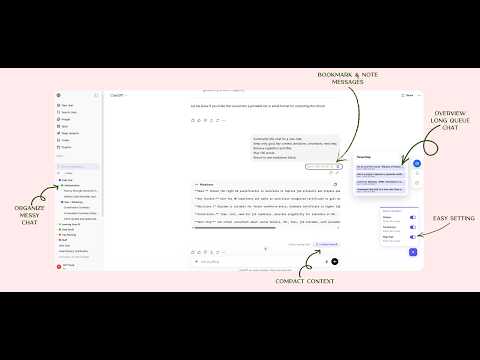
Are you tired of long ChatGPT chats losing context? Messy sidebar chat which you can't organize them? Introduce GPTDesk - a ChatGPT productivity extension that helps you organize chats, manage long conversations, and quickly find important information. If you use ChatGPT for work, study, research, coding, writing, or daily tasks, GPTDesk turns messy AI conversations into a structured workspace. It helps you clean up yourChatGPT sidebar, organize chats into folders, bookmark important answers, add notes, and navigate long threads without losing track of key context. ⚡Compact long ChatGPT conversations: Long ChatGPT sessions often become difficult to manage. Important context gets buried, and continuing the same thread can feel slower and less focused. GPTDesk helps you compact a long chat into the essential context you want to keep, then export it as simple Markdown so you can start a fresh chat with a cleaner, more useful summary. 🗂️ Organize ChatGPT with folders: Turn a cluttered ChatGPT sidebar into a clean, structured system with nested folders and color folders. Group chats by project, client, topic, workflow, or priority so your ChatGPT workspace feels like a real productivity tool instead of a long list of random conversations. 💬Get a quick overview with Thread Maps: Scrolling through a long ChatGPT conversation to find one useful answer is slow and frustrating. Thread Maps gives you a fast overview of the conversation structure so you can quickly scan a long thread and jump to the part you need. 🔖Bookmark and annotate important messages: Found a valuable answer you want to revisit later? With bookmarks and notes, you can save important ChatGPT messages, return to them quickly, and add your own context or reminders. This makes it easier to build a personal knowledge system on top of your AI chats. 🎯Built for productivity and privacy: GPTDesk is designed to be easy to use, lightweight, and practical. There are no hidden fees, no unnecessary complexity, and no data storage. Your data stays in your browser and the extension runs directly in Chrome. 🏆 Why install GPTDesk: - Compact long conversations into essential context to a simple markdown - Organize ChatGPT chats with nested folders and color folders - Use Thread Maps to navigate long chats faster - Bookmark important ChatGPT messages - Add notes to saved messages - Improve AI workflow, productivity, and knowledge management - Keep your data local in your browser 🚀 GPTDesk works with ChatGPT today, with Gemini support planned for the future.
5 out of 53 ratings
Details
- Version1.0.0
- UpdatedApril 15, 2026
- Size92.66KiB
- LanguagesEnglish
- DeveloperKhanh N PhamWebsite
Unit 104/26 Dunlop Ave Ascot Vale, VIC 3032 AUEmail
ph.khanh87@gmail.comPhone
+61 451 719 339 - TraderThis developer has identified itself as a trader per the definition from the European Union and committed to only offer products or services that comply with EU laws.
Privacy

This developer declares that your data is
- Not being sold to third parties, outside of the approved use cases
- Not being used or transferred for purposes that are unrelated to the item's core functionality
- Not being used or transferred to determine creditworthiness or for lending purposes
Support
For help with questions, suggestions, or problems, visit the developer's support site