


Overview
Side Chat, Prompt Library/Optimizer for ChatGPT, Timestamp, Bookmark, Folder, Bulk Delete, Smart Follow-up, Minimap
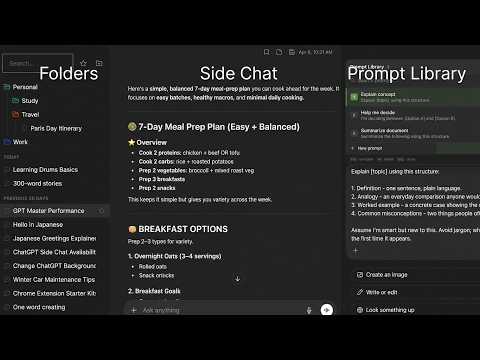
ChatGPT gives you brilliant answers and a single scrolling list to find them in. GPT Master closes that gap. Side-chat any reply to ask follow-ups without polluting your main thread. Save and reuse your best prompts with one-click insert and AI enhancement. Tame long chats with a speed booster and minimap. Organize everything with folders, bookmarks, timestamps, and bulk actions. The power-user surface ChatGPT never built. FEATURES 🧵 Side Chat - Ask any questions in a side thread without polluting your main chat 📚 Prompt Library - Save reusable prompts and insert them with one click from a searchable palette - Save any ChatGPT response directly to your library with the per-message save button — smart auto-labelling does the work ✨ Prompt Enhance - Rewrites your prompt with AI before sending so you get better answers with less effort ⚡ Speed Booster - Keeps long conversations fast by only rendering nearby messages - Cuts memory use in threads with hundreds of exchanges 🌙 Legacy Dark Mode - Bring back the classic ChatGPT dark theme — the softer pre-OLED gray look 🗺️ Minimap (Chat Outline) - Visual table of contents for long conversations - stop scrolling through 50+ messages - Jump to any section with one click 📦 Bulk Actions - Multi-select conversations for batch move, archive, star, or delete 🗂️ Folders - Create folders and nested subfolders to organize ChatGPT by project, client, or topic - Assign custom colors for fast visual scanning - Drag and drop conversations between folders - Rename, delete, and restructure anytime 🔖 Bookmarks - Bookmark specific messages within conversations - Jump back to any bookmarked message from the sidebar ⏰ Timestamps - See exactly when each message was sent - know when ideas happened ⭐ Stars - Star important threads for one-click retrieval - stop scrolling to find what matters 🏷️ Conversation Tags - Tag conversations with custom labels to group them across folders 📝 Notes & Highlights - Write notes on any conversation and bookmark key passages - Organize your thoughts alongside your conversations 💬 Smart Follow-Up Suggestions - AI-generated follow-up prompts appear after each response - One click to keep the conversation going - no more staring at a blank prompt 🔍 Search - Search conversations by title and content - Filter by folder, star status, or tag 🧭 Conversation Context Menu - Right-click any conversation for quick actions: Copy Link, Move to Folder, Add Note, View Details, and Delete - Conversation Details panel shows title, model, message count, folder, creation date, and starred status Works on chatgpt.com. Free to install. Compatible with ChatGPT Free, Plus, and Team plans. Turn ChatGPT into a real workspace.
4.8 out of 599 ratings
Details
- Version2.33.5
- UpdatedJune 25, 2026
- Size1.12MiB
- Languages54 languages
- Developer
- Non-traderThis developer has not identified itself as a trader. For consumers in the European Union, please note that consumer rights do not apply to contracts between you and this developer.
Privacy

GPT Master - Chat Power Toolkit has disclosed the following information regarding the collection and usage of your data. More detailed information can be found in the developer's privacy policy.
GPT Master - Chat Power Toolkit handles the following:
This developer declares that your data is
- Not being sold to third parties, outside of the approved use cases
- Not being used or transferred for purposes that are unrelated to the item's core functionality
- Not being used or transferred to determine creditworthiness or for lending purposes