

rmvbg: Remove Background, Screenshot & Screen Recorder
3 ratings
)
Overview
Remove photo backgrounds with a right-click, take full-page or area screenshots that blur private info, mark them up and record.
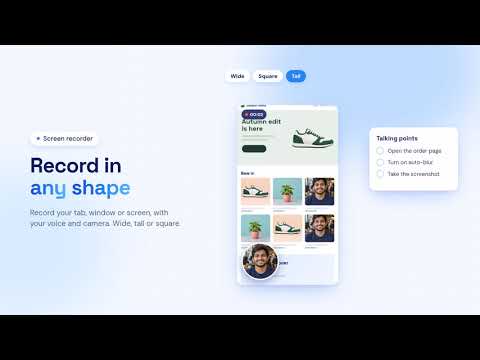
Rmvbg puts a background remover, a screenshot tool and a screen recorder in your browser toolbar. ## REMOVE PHOTO BACKGROUNDS * Right-click a photo on a web page and choose "Remove background with rmvbg". * The photo opens on rmvbg.xyz, where the background is removed inside your browser. Download a transparent PNG with no watermark. * You can also open the photo in the product photo, profile picture or passport photo tools. * "Find photos" lists the photos on the current page so you can pick several at once. * Attach photos from your computer, or paste a photo link. ## SCREENSHOTS * Capture the full page, a box you drag, or the visible part of the page. * Optional countdown (3, 5 or 10 seconds) for menus and pop-ups. * Mark up with arrows, boxes, highlighter, pen, text, numbered steps, blur and crop. * Add a background, rounded corners, a shadow or a browser or device frame. * Save as PNG, JPG or PDF, or copy to the clipboard. Includes a color picker. * Shortcuts: Alt+Shift+S full page, Alt+Shift+A area. ## BLUR PRIVATE INFO * Turn on "Auto-blur private info" and emails, phone numbers, card numbers, passwords and keys on the page are covered before a screenshot is taken. * "Blur this tab" covers them while you share or record your screen. * It runs on your computer. The page is not changed, nothing found is saved or sent, and the cover is removed when you finish. * Content inside frames from other websites cannot be covered, so please check your screenshot before sharing it. ## SCREEN RECORDER * Record a tab, a window or your whole screen, with or without your microphone and camera. * Drag your camera bubble anywhere in the video, pick a circle, rounded or square shape, and blur the room behind you. * "Clean up my voice" cuts hum and hiss and evens out loud and quiet parts while you record. * Choose wide, tall, square or portrait video, add your logo and keep talking points on screen. * Recordings are saved on your computer while you record, so closing the tab by mistake does not lose them. * Open a recording in the rmvbg video tools to trim it, turn it into MP3, or edit it in rmvbg Studio. ## RMVBG STUDIO * Subtitles with ready-made templates, auto zoom, titles, background music and voice clean-up. * Share one link with time-stamped comments. * Copy the text out of a screenshot. * Save recordings and screenshots to your own Google Drive, with a download link. * Choose to auto-delete cloud videos and screenshots after 3, 5 or 7 days. ## FREE AND PAID FEATURES * The background remover, screenshots, markup, frames, privacy blur and the screen recorder are free, with no account needed. * rmvbg Studio (saving, editing and sharing recordings), cloud backup, Google Drive saving and bigger photo picks are part of rmvbg Pro, an optional paid plan. * There are no daily limits on free features today; this page will be updated before any limit starts. ## YOUR DATA * The extension only looks at a page when you ask it to (a right-click, "Find photos", a screenshot or a blur). * When you ask to remove a photo's background, the photo's web address is sent to rmvbg.xyz so the photo can be fetched. * Screenshots and recordings stay on your computer. They are uploaded only if you sign in and choose to back them up, save them to your account, make a share link or send them to your Google Drive. * If you connect Google Drive, rmvbg can only see the files it saves there — never the rest of your Drive. * No ads in the extension. We do not sell your data. * Privacy policy: https://rmvbg.xyz/privacy ## ADDITIONAL INFO * Some tools open on rmvbg.xyz and need an internet connection. Works in Chrome and other Chromium-based browsers. * Help and contact: https://rmvbg.xyz/contact
5 out of 53 ratings
Details
- Version1.17.0
- UpdatedNovember 16, 2026
- Offered byImmense Hut
- Size161KiB
- Languages2 languages
- DeveloperJahed Ahmed
Nurpur, Goalabazar, Osmaninagar, Sylhet-3124 Sylhet 3124 BDEmail
meetjahed@gmail.comPhone
+880 1969-057098 - TraderThis developer has identified itself as a trader per the definition from the European Union and committed to only offer products or services that comply with EU laws.
Privacy

rmvbg: Remove Background, Screenshot & Screen Recorder has disclosed the following information regarding the collection and usage of your data. More detailed information can be found in the developer's privacy policy.
rmvbg: Remove Background, Screenshot & Screen Recorder handles the following:
This developer declares that your data is
- Not being sold to third parties, outside of the approved use cases
- Not being used or transferred for purposes that are unrelated to the item's core functionality
- Not being used or transferred to determine creditworthiness or for lending purposes
Support
For help with questions, suggestions, or problems, please open this page on your desktop browser