

Overview
A better Reader Mode — with text-to-speech, voice selection, custom themes, image toggle, and multi-language support.
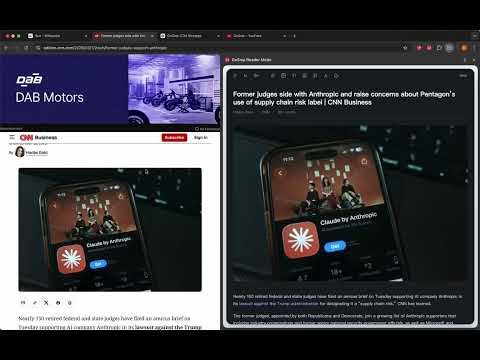
GoSnip Reader Mode is built for people who want more than a basic reading mode. Instead of replacing your current tab with a stripped-down page, it opens a focused reading workspace in Chrome's side panel. That means you can keep the original page visible for context, references, images, comments, or navigation while reading the clean article version beside it. On any supported page, the extension extracts the main article content locally in your browser and removes much of the noise that makes web reading tiring. You can then read in a calmer layout, switch themes, adjust font style and size, change line spacing, widen text, disable links, and listen with built-in read-aloud controls. Key features: - Extract the main article content from webpages into a focused reading view - Keep the original page visible while reading in the side panel - Open Reader Mode directly from the toolbar or the page context menu - Listen with read-aloud using system voices available in your browser - Adjust reading speed and choose different voices - Auto-detect article language and match the best available voice for each language segment - Show or hide images and videos depending on how you want to read - Change theme, font, font size, spacing, and text width for better comfort - Disable links in the reading view when you want fewer distractions - Keep your reading preferences saved locally on your device Great for: - Reading long articles without ads, sidebars, and visual clutter - Comparing the clean reading view with the original source page side by side - Reviewing reference material while keeping the source page open - Listening to articles while multitasking - Language learning and accessibility-friendly reading - Students, researchers, and knowledge workers who read heavily in Chrome How data is handled: - Article extraction runs locally in the browser - Read-aloud uses the browser's available system voices - Reading preferences are stored locally on the device - Based on the current codebase, the extension does not send page content to GoSnip servers for reader mode processing - The only external links in the product are help and website links opened when the user clicks them If basic reading mode feels too limited, GoSnip Reader Mode gives you a more flexible way to read: clean text, side-by-side context, read-aloud, and deeper control, all inside Chrome.
0 out of 5No ratings
Details
- Version1.0.0
- UpdatedApril 7, 2026
- Size137KiB
- Languages3 languages
- DeveloperWebsite
Email
support@gosnip.io - Non-traderThis developer has not identified itself as a trader. For consumers in the European Union, please note that consumer rights do not apply to contracts between you and this developer.
Privacy

This developer declares that your data is
- Not being sold to third parties, outside of the approved use cases
- Not being used or transferred for purposes that are unrelated to the item's core functionality
- Not being used or transferred to determine creditworthiness or for lending purposes
Support
For help with questions, suggestions, or problems, please open this page on your desktop browser