

GOshorts!

Descripción general
GOshorts! convierte URLs en atajos. Usa: go [espacio/Tab] tu-atajo → Enter.
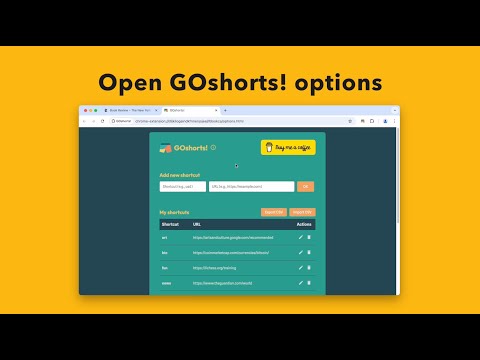
GOshorts! is a lightweight Chrome extension that transforms your most‑used URLs into easy‑to‑remember shortcuts. Simply type go + space/tab + your‑shortcut in the address bar and hit Enter to jump straight to the site you need. Key features: Custom shortcuts: Define your own keyword → URL mappings in the Options page. Quick add & edit: One‑click UI for adding, renaming or removing shortcuts without touching your bookmarks. Import & export: Backup or share your entire list as CSV to keep your shortcuts in sync across devices. Clickable preview: Test any URL by clicking it directly in the table—no copy‑pasting required. Multi‑language support: Fully localized UI via Chrome’s i18n system. On‑boarding help: An interactive info banner guides you through setup and links straight to the FAQ. Modern, accessible design: Clean interface with keyboard focus and hover states. Whether you’re a power user racing between dashboards or someone who just wants to type less, GOshorts! helps you zip around the web at lightning speed. How it works - Install GOshorts! and type go + Space + Enter in the Chrome address bar. - Enter any of your custom shortcuts (e.g. go usd) and press Enter. - If the shortcut exists, your target page opens instantly; otherwise you’ll be taken to your default search engine. Pick up speed today—ditch the bookmarks, slash those clicks, and go!
0 de 5Sin valoraciones
Detalles
- Versión1.0
- Actualizado22 de abril de 2025
- Ofrecido porJimmyZen
- Tamaño2.4MiB
- Idiomas20 idiomas
- Desarrollador
Correo electrónico
jimzn@proton.me - No operadorEste desarrollador no se ha identificado como operador. Los consumidores residentes en la Unión Europea deben tener en cuenta que los derechos de los consumidores no son aplicables a los contratos que suscriban con este desarrollador.
Privacidad

Este desarrollador declara que tus datos:
- No se venden a terceros, excepto en los casos de uso aprobados
- No se usan ni se transfieren para fines no relacionados con la función principal del elemento.
- No se usan ni se transfieren para determinar la situación crediticia ni para ofrecer préstamos.
Ayuda
Si tienes alguna pregunta, sugerencia o problema, visita el sitio de asistencia del desarrollador.