

Google Sheets Keyboard Shortcuts — MasterKey
2 ratings
)
Overview
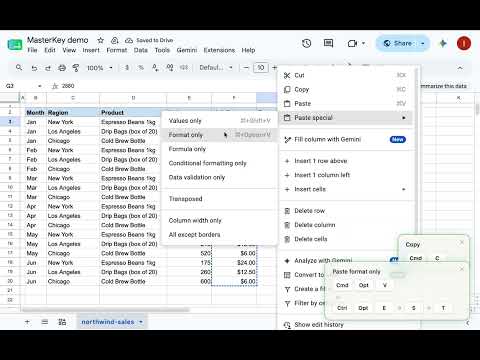
Learn Google Sheets keyboard shortcuts without trying. MasterKey shows the shortcut the moment you click — no cheat sheet needed.
Still reaching for the mouse in Google Sheets? MasterKey shows you the keyboard shortcut the moment you trigger an action — no studying, no cheat sheet, no extra effort. Just work as you normally do, and the shortcuts come to you. Inspired by IntelliJ's Key Promoter X — built specifically for Sheets. 🎯 Who it's for - Daily Sheets users who haven't found time to memorize shortcuts - People who forget shortcuts mid-task even after trying to learn them - Anyone who wants to work faster without studying a cheat sheet ⚡ Features Real-time shortcut hints Every time you use the mouse to trigger a Sheets action, a toast notification shows the keyboard shortcut — in context, at the moment you need it. Mastery progress tracker The side panel shows the status of 200+ tracked shortcuts at a glance: mastered, learning, or not yet tried. Personalized recommendations MasterKey detects which actions you keep doing with the mouse and suggests the highest-priority shortcuts to learn next. Usage summary See your total actions, keyboard usage rate, and estimated time saved — so you can track real improvement over time. 🔒 Privacy first - Your data stays on your device — cell contents, typed text, and personal info are never sent externally - Anonymous usage statistics (numeric counts only) are on by default to improve the product — you can turn them off anytime in settings - No cell contents, typed text, or personal information is ever collected - Pro plan payments are handled securely by Stripe / ExtensionPay — the extension never sees your card details How to use 1. Install the extension 2. Open any Google Sheets spreadsheet 3. Use Sheets as you normally would — a popup appears whenever a shortcut exists for what you clicked 4. Click the M icon in the Chrome toolbar to open the side panel and track your progress Full shortcut list and how it works: https://getmasterkey.app
5 out of 52 ratings
Details
- Version0.2.8
- UpdatedJuly 30, 2026
- Offered bymmnnn
- Size2.37MiB
- Languages2 languages
- Developer
Email
mmnnn0613@gmail.com - Non-traderThis developer has not identified itself as a trader. For consumers in the European Union, please note that consumer rights do not apply to contracts between you and this developer.
Privacy

Google Sheets Keyboard Shortcuts — MasterKey has disclosed the following information regarding the collection and usage of your data. More detailed information can be found in the developer's privacy policy.
Google Sheets Keyboard Shortcuts — MasterKey handles the following:
This developer declares that your data is
- Not being sold to third parties, outside of the approved use cases
- Not being used or transferred for purposes that are unrelated to the item's core functionality
- Not being used or transferred to determine creditworthiness or for lending purposes