

Google Sheets Excel Shortcuts & Trace Formula

Présentation
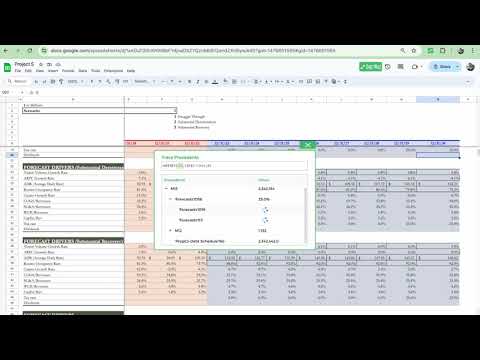
SheetWhiz brings Trace Precedents & Dependents, Goal Seek, What-If, Macabacus format cyclings, and Excel & PPT shortcuts to Google
Key features include: • Excel and PowerPoint shortcuts in Google Sheets and Slides, fully customizable on Mac and PC • Trace Precedents and Trace Dependents to instantly see formula relationships and navigate with arrow keys • Goal Seek and What-If analysis for financial models, budgets, and forecasts • Format Cycling to apply consistent number formats, company colors, and indentation cycles, similar to Macabacus and Arixcel • Export Selection as Image to copy cells into Slides or Docs while preserving formatting and linking to the source • Auto-Color to highlight hardcoded inputs and linked cells for faster spreadsheet audits Why SheetWhiz: • Familiar to anyone who has used Excel add-ins like Macabacus, Arixcel, FactSet, or CapIQ, but built specifically for Google Sheets and Slides • Designed for finance and operations teams who rely on Excel speed but work in Google Sheets • Works across Mac and Windows with native key mappings • Customizable shortcuts and formatting cycles to match your workflow • Secure and private: SheetWhiz never sees or stores your spreadsheet data and is SOC 2 Type 2 compliant Full Shortcuts List: • Trace Precedents • Trace Dependents • Goal Seek • What-If Data Sensitivities • Paste Special (Formulas, Values, etc.) • Insert & Delete Columns / Rows + Option to Always Select FULL Rows & Columns • All Border Shortcuts • Autofit & Set Column Width & Row Height • Align Center, Left, Right, Top, Middle, Bottom • Increase & Reduce Decimals • Font Shortcuts • Show / Hide Gridlines • Export Selection as Image • Auto-Color Selection & Sheet • Add / Remove Filters and Filter Dropdown Menu • Number Cycles • Font Color Cycle • Cell Fill Cycle • Wrap, Clip, Overflow Text • Freeze & Unfreeze Columns / Rows • Merge & Unmerge Cells • Google Slides - Bring to Front, Send to Back, Bring Forward, Send Backwards • Google Slides - Distribute Horizontally & Vertically • Google Slides - Align Objects Left, Center, RIght, Top, Middle, Bottom • Google Slides - Align Text Left, Center, RIght, Top, Middle, Bottom • Google Slides - Font Shortcuts • Google Slides - Grouping Shortcuts All new installs include a 21-day free trial of the Pro plan. After the trial you continue on the Free plan with core formatting shortcuts, with the option to upgrade anytime.
4,9 sur 548 avis
Détails
- Version2.1.1
- Dernière mise à jour16 décembre 2025
- FonctionnalitésPropose des achats via l'application
- Taille2.51MiB
- LanguesEnglish (United States)
- DéveloppeurKalo Technologies, Inc.Site Web
908 Florida St San Francisco, CA 94110-2807 USE-mail
info@sheetwhiz.comTéléphone
+1 808-542-1170 - ProfessionnelCe développeur s'est identifié comme professionnel selon la définition de l'Union européenne et s'engage à ne proposer que des produits ou services conformes aux lois de l'UE.
Confidentialité
Ce développeur déclare que vos données :
- Ne seront pas vendues à des tiers en dehors des cas d'utilisation approuvés.
- Ne seront ni utilisées ni transférées à des fins sans rapport avec la fonctionnalité de base de l'article.
- Ne seront ni utilisées ni transférées pour déterminer votre solvabilité ou en vue de vous proposer un prêt.