


Overview
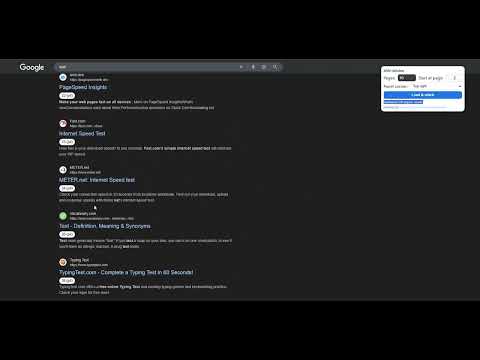
Bring Back SERP 100 to Google Search. Auto-number, stitch Google SERPs, skip duplicates, and resize the panel.
Bring Back SERP 100 to Google Search Google SERP Stitcher helps SEO workflows by merging multiple Google result pages into one continuous, scrollable SERP view. The extension automatically numbers organic Google results as soon as the search page loads. It then lets you fetch and stitch additional result pages into the same view. Each result keeps a clear rank number and source page, so you can review rankings faster without relying on Google’s removed or unstable num=100 behavior. Main features: - Automatically numbers organic Google results on page load. - Stitches additional Google result pages into one continuous SERP. - Continues numbering correctly when more pages are loaded. - Shows each result’s rank and original Google source page. - Skips duplicate URLs while stitching. - Supports Classic Web Results mode using udm=14 for cleaner SERPs. - Helps reduce AI Overview and rich-result clutter when Classic mode is enabled. - Detects Google verification or challenge pages and reports them clearly. - Includes optional Auto-stitch on page load with a clear warning that automatic fetching may increase Google verification or CAPTCHA risk. - Includes a movable panel with saved corner placement, center placement, and Manual drag mode. - Includes a resizable panel that can be widened, narrowed, raised, or lowered. - Saves panel position, panel size, Classic Web Results preference, and Auto-stitch preference. - Preserves Manual drag position when the browser window is resized. - Supports organic results from Google-owned content domains such as play.google.com. How to use: Install the extension, open a Google search, choose whether to use Classic Web Results mode, select how many additional pages to fetch, and click “Load & stitch”. The extension loads additional result pages, skips duplicate URLs, appends the organic results into one ranked page, and keeps numbering stable so you can review positions quickly in a single scrollable SERP. What's New in Version 1.4.13 *Fixed missing organic result numbering in some RTL and dynamically grouped Google result layouts. *Improved result detection across different Google SERP structures. *Numbering now reconnects automatically after dynamic search navigation. *The selected Pages value is now saved and restored for future Auto‑stitch sessions.
5 out of 55 ratings
Details
- Version1.4.13
- UpdatedAugust 13, 2026
- Size303KiB
- LanguagesEnglish
- DeveloperWebsite
Email
seo.a.analytics@gmail.com - Non-traderThis developer has not identified itself as a trader. For consumers in the European Union, please note that consumer rights do not apply to contracts between you and this developer.
Privacy

This developer declares that your data is
- Not being sold to third parties, outside of the approved use cases
- Not being used or transferred for purposes that are unrelated to the item's core functionality
- Not being used or transferred to determine creditworthiness or for lending purposes
Support
For help with questions, suggestions, or problems, please open this page on your desktop browser