

Google Keep - Full Screen Edit

Visão geral
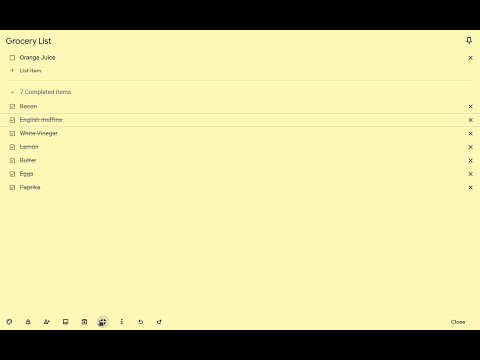
Makes note editing take up the full browser window
VERSION 1.4.1 --------------------------------------------------------------------------------------------------- * Allows Google Keep editing to use the full browser window. * Allows toggling full screen on and off by clicking on an icon added on the notes. * Remembers full screen status across sessions * Supports Dark Mode * Works with non-English language settings * Options page to customize behavior (width, padding, background) * Customizable keyboard shortcut (Ctrl+Shift+F or Cmd+Shift+F by default) to toggle full screen on and off * 🆕 Options allow fading out extra note items (menu, labels, etc) for even more distraction-free work and focus on the note content * 🆕 Options allow customizing horizontal and vertical padding separately * 🆕 Improved padding styling that works with labels, previews, etc. * 🆕 Icons to help identify options View Demo Here: https://cmp.onl/tjqC WARNINGS & IMPORTANT NOTES * **Use this extension at your own risk.** It shouldn't cause problems, but I can't make any guarantees. It's wise to keep critical notes [backed up](https://support.google.com/keep/answer/10017039?hl=en). * **This extension only works with the website version** of Google Keep (ie. https://keep.google.com) - it won't work with the "app" version (the one you might install and launch from your app menu -ie. for offline use). * At this time, clicking the extension icon itself does not toggle anything - click the full-screen icon added to the note itself (or use the keyboard shortcut) to toggle full-screen on and off. INSTRUCTIONS * Full-screen is enabled by default when you first install the extension. * Use the full-screen icon at the bottom of the note to toggle full-screen on and off as needed. * Alternatively, use the keyboard shortcut, which you can customize at "chrome://extensions/shortcuts" * Your selection will be remembered between notes and sessions. * Open the extension options (from a note menu, Keep menu, extension icon menu or extension page) to customize behavior. Like the Extension? Rate or review it here to help others find it: https://cmp.onl/tnEd Found a bug? Have a suggestion? Submit it here: https://cmp.onl/tngy Source Code: https://github.com/chrisputnam9/chrome-google-keep-full-screen Thanks to all who have contributed reviews, suggestions, bug reports, etc. Special thanks to @MartinLichtblau, @tbrodbeck, @JnLlnd, @dylankenneally, @Paliec, @macdonaldster, @kellerbeing, @Palivec Developer sustenance funding ($ support) is welcome * https://ko-fi.com/chrisputnam9 * https://github.com/sponsors/chrisputnam9
4,6 de 589 notas
Detalhes
- Versão1.4.1
- Atualização16 de abril de 2025
- Tamanho159KiB
- IdiomasEnglish
- DesenvolvedorWebsite
E-mail
chrisputnam9@gmail.com - Não negocianteEsse desenvolvedor não se identificou como comerciante. Caso você seja da União Europeia, observe que os direitos do consumidor não se aplicam a contratos firmados entre você e esse desenvolvedor.
Privacidade

O desenvolvedor declara que seus dados
- Não são vendidos a terceiros, exceto nos casos de uso aprovados
- Não são usados ou transferidos para fins não relacionados à função principal do item
- Não são usados ou transferidos para informações de crédito ou empréstimo
Suporte
Para receber ajuda com perguntas, sugestões ou problemas, abra esta página no seu navegador para computador