

Goniometer
11 个评分
)
概述
Virtual Goniometer by Ryan Mo
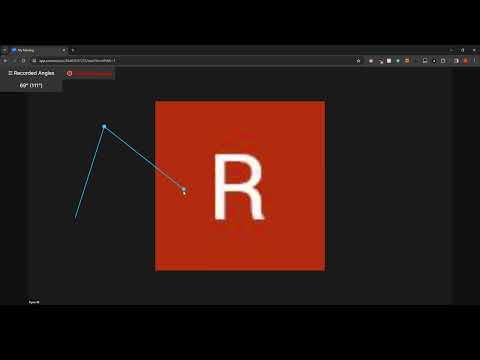
This virtual goniometer is an easy to use tool for clinicians to measure angles of joint range of motion during live virtual care sessions. After opening the extension by clicking on the icon, please click the "Start Measuring" button. Next, press the "\" (backslash) key on the keyboard to begin taking measurements. When finished, click the "Stop Measuring" button. While taking measurements, you will be unable to interact with other buttons in the video call until the Stop Measuring button is clicked. Click to mark the points of your stationary goniometer arm, the axis of rotation, and the measuring arm. As you are measuring there will be a live display of the current angle, with the supplementary angle in brackets. Find all measured angles recorded in the left side panel, and easily copy all values with the copy button. To hide the "Recorded Angles" tab in the top left corner of the page, press the "`" (backquote or backtick) key which is next to the number 1 on the keyboard. This extension should work on any video conferencing platform that uses Chrome. So far, it has been tested on Zoom, MS Teams, OTN, Adracare, and Doxy. If there are other platforms that do not currently work and you would like to have it supported, please send me an email and I will get back to you when possible. To use the goniometer on photos from your computer, use the following instructions: - Right click the extension icon in the top right of your browser > click manage extensions > click allow access to file URLs - Drag and drop the image into the Chrome browser You should now be able to use the extension on local images.
3.8 星(5 星制)11 个评分
详情
- 版本0.0.14
- 上次更新日期2025年9月24日
- 提供方ryanmopt
- 大小13.31KiB
- 语言English
- 开发者
邮箱
ryanmopt@gmail.com - 非交易者该开发者尚未将自己标识为交易者。欧盟地区消费者须知:消费者权利可能不适用于您与该开发者达成的合约。
隐私权

该开发者已声明,您的数据:
- 不会因未获批准的用途出售给第三方
- 不会为实现与产品核心功能无关的目的而使用或转移
- 不会为确定信用度或放贷目的而使用或转移
支持
若有任何疑问、建议或问题,请在桌面浏览器中打开此页面