

Goniometer
11 оценок
)
Обзор
Virtual Goniometer by Ryan Mo
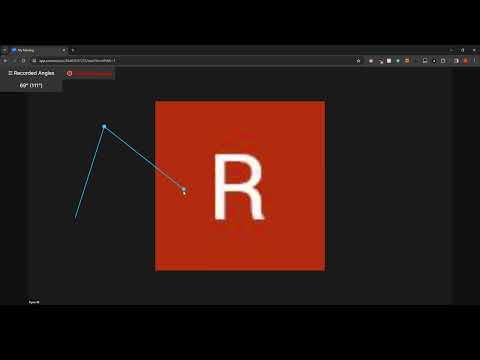
This virtual goniometer is an easy to use tool for clinicians to measure angles of joint range of motion during live virtual care sessions. After opening the extension by clicking on the icon, please click the "Start Measuring" button. Next, press the "\" (backslash) key on the keyboard to begin taking measurements. When finished, click the "Stop Measuring" button. While taking measurements, you will be unable to interact with other buttons in the video call until the Stop Measuring button is clicked. Click to mark the points of your stationary goniometer arm, the axis of rotation, and the measuring arm. As you are measuring there will be a live display of the current angle, with the supplementary angle in brackets. Find all measured angles recorded in the left side panel, and easily copy all values with the copy button. To hide the "Recorded Angles" tab in the top left corner of the page, press the "`" (backquote or backtick) key which is next to the number 1 on the keyboard. This extension should work on any video conferencing platform that uses Chrome. So far, it has been tested on Zoom, MS Teams, OTN, Adracare, and Doxy. If there are other platforms that do not currently work and you would like to have it supported, please send me an email and I will get back to you when possible. To use the goniometer on photos from your computer, use the following instructions: - Right click the extension icon in the top right of your browser > click manage extensions > click allow access to file URLs - Drag and drop the image into the Chrome browser You should now be able to use the extension on local images.
3,8 из 511 оценок
Подробности
- Версия0.0.14
- Обновлено24 сентября 2025 г.
- Автор:ryanmopt
- Размер13.31KiB
- ЯзыкиEnglish
- Разработчик
Электронная почта
ryanmopt@gmail.com - Не продавецРазработчик не указал для себя статус продавца. Просим клиентов из Европейского союза обратить внимание, что на сделки между вами и этим разработчиком не распространяются законы о защите прав потребителей.
Конфиденциальность

Этот разработчик утверждает, что ваши данные:
- Не продаются третьим лицам, за исключением разрешенных вариантов использования
- Не используются и не передаются в целях, не связанных с работой основных функций продукта
- Не используются и не передаются для определения платежеспособности или в целях кредитования
Поддержка
Чтобы сообщить об ошибках в работе продукта, задать вопрос или поделиться идеями, откройте эту страницу в браузере для компьютера.