

Shein Images Downloader
1 rating
)
Overview
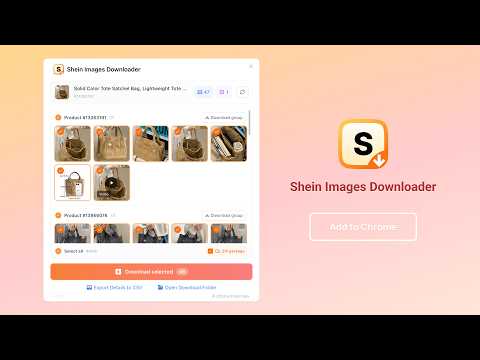
Download Shein product images, videos, and variant media. Batch save high-quality files to ZIP and export media details to CSV.
Shein Images Downloader is a simple Chrome extension for downloading high-quality product images and videos from supported Shein product pages. Open a product, launch the downloader and save the media you need—no coding or technical setup required. Download an image or video individually, select a complete product variant or save multiple files together. Package selected media into one ZIP, download files to a named folder, export useful media details to CSV or process multiple Shein product URLs from one bulk page. Whether you are saving fashion inspiration, organizing product references, preparing catalog research or archiving your favorite items, this extension makes collecting Shein product media quick and straightforward. Choose what you want, skip repetitive right-click saving and bring organized Shein images and videos to your desktop in just a few clicks. 💡 WHY CHOOSE SHEIN IMAGES DOWNLOADER? 🔹 Simple, No-Code Downloads Open a supported product page and start downloading without scripts, developer tools or manual URL hunting. 🔹 More Than Main Product Photos Collect product images, the best usable product video and media from available variants in one clear interface. 🔹 Download Only What You Need Save one file, choose a complete variant or select multiple images and videos for a batch download. 🔹 Organized Output Keep downloads manageable with ZIP packaging, custom file names, separate variant groups and optional CSV media details. ✨ KEY FEATURES ✅ Download Shein product images, videos and available variant media ✅ Save one file or batch download selected media to a folder or ZIP ✅ Browse clearly separated Product #ID groups and preview the best usable video ✅ Export product IDs, image URLs, video URLs and selected local paths to CSV ✅ Process multiple Shein product URLs with the Pro bulk download queue 🎯 PERFECT FOR - Online sellers organizing permitted product media references - Catalog and merchandising teams collecting product photos by variant - Designers and content teams preparing visual mood boards or research - Market researchers comparing Shein product images and videos - Shoppers saving product photos and videos for personal reference - Spreadsheet users who need product media URLs in CSV format - Users who need images from several variants of one Shein product - Teams processing a permitted list of Shein product pages in one workflow 📋 HOW TO USE 1. Click the extension icon or the shortcut on the main product image 2. Review the product groups and click media cards to select images or videos 3. Use the button inside a media card to download one file 4. Pro users can select multiple files and choose whether to create a ZIP package 5. Click "Download Selected" to start the batch download 6. Click "Export Details to CSV" when you need a separate media report 🖼️ PRODUCT MEDIA AND VARIANTS The downloader reads media made available by the current Shein product page and groups it by product ID. Images from the current product are placed into the appropriate product group instead of creating a duplicate “Product media” section. When a page exposes several versions of the same product video, the extension compares the available sources, removes duplicates and keeps the best usable video. Unsupported streaming playlists and inaccessible media URLs are skipped. Media availability can vary by product, country storefront and changes made by Shein. The extension downloads only the media that the current page makes available to your browser. 📦 DOWNLOAD OPTIONS Single Download — Save one image or video directly to your browser's default download location Folder Download — Save multiple selected files into a folder using your custom naming rule ZIP Package — Save selected images and videos in one flat ZIP file without extra internal folders Multi-URL Bulk Download — Process multiple supported Shein product URLs and create a separate ZIP for each completed product 📊 CSV EXPORT CSV export is a separate Pro action, so you decide when a media report is needed. Each product variant is written as one row with these friendly columns: - Product ID - Image URLs - Video URLs - Local Image Paths - Local Video Paths Multiple media values are placed on separate lines within the same CSV cell. Remote URL columns describe the variant media found on the page. Local path columns are included only for media selected when the CSV is created. 📝 CUSTOM FILE-NAME RULES Use the Settings tab to create reusable templates for: - Folder / ZIP Name - Media File Name - Export Filename Available variables include product ID, product title, media type, original file name, sequence number, file count, date and date/time. The available variable menu changes to match each naming field, helping prevent unsupported placeholders. 💎 FREE VS PRO FREE Features: ✓ Download one image or video at a time ✓ Download medium-quality media when available ✓ Fall back to a thumbnail when a medium-quality image is unavailable ✓ Browse product variants, images and videos in the same downloader interface ✓ Preview videos and choose the exact file you want ✓ Customize individual media file names PRO Features: ✓ Download the best available media quality ✓ Use original-quality media when available, with quality fallback when needed ✓ Select complete groups or multiple images and videos ✓ Batch download selected media to a folder or ZIP package ✓ Export product IDs, media URLs and selected local paths to CSV ✓ Process multiple Shein product URLs from the bulk download page ✓ Apply custom folder, ZIP and CSV names to batch downloads and exports 🔒 PRIVACY NOTICE Product media detection, selection, naming, ZIP creation and CSV generation take place in your browser. Media files are fetched from Shein's media servers and saved directly through your browser's download system. The extension does not use a server-side media proxy. Account, configuration, feedback and subscription features may connect to echobot.dev when needed. Payments are handled by secure third-party payment providers, and the extension does not store your card details. Download and use product media only when you have the right or permission to do so. You are responsible for respecting copyright, intellectual property, platform terms and other rules that apply to your use. ⚠️ DISCLAIMER This extension is an independent tool and is not affiliated with, endorsed by, sponsored by or associated with Shein or any of its affiliates. Shein and related marks are trademarks of their respective owners. Shein Images Downloader is intended for legitimate personal reference, catalog organization, research and permitted media-management workflows. Users are responsible for complying with Shein's Terms of Use and all applicable laws in their jurisdiction. Do not use downloaded media in a way that infringes copyright, trademarks or other rights.
5 out of 51 rating
Details
- Version1.0.0
- UpdatedJuly 10, 2026
- Offered byAddonsNext
- Size594KiB
- Languages54 languages
- Developer
Email
support@addonsnext.com - Non-traderThis developer has not identified itself as a trader. For consumers in the European Union, please note that consumer rights do not apply to contracts between you and this developer.
Privacy

This developer declares that your data is
- Not being sold to third parties, outside of the approved use cases
- Not being used or transferred for purposes that are unrelated to the item's core functionality
- Not being used or transferred to determine creditworthiness or for lending purposes