

Proxy Switch

Overview
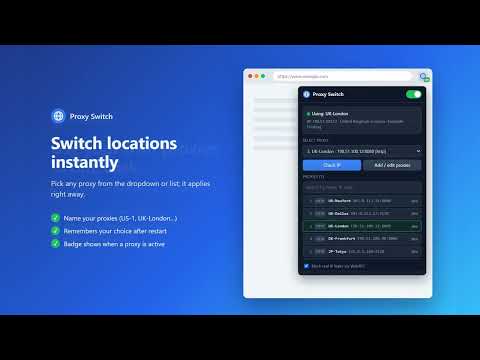
Use your own proxies in Chrome (HTTP/HTTPS/SOCKS), with automatic user/pass login and WebRTC leak protection.
Proxy Switch is a simple, lightweight way to use your own proxies in Chrome. Paste your proxy list once, then switch between proxies with a single click. KEY FEATURES • One-click on/off – turn the proxy on or off with a single toggle. • Quick switching – pick any proxy from the dropdown or the list; it applies instantly. • Automatic login – the extension sends your proxy's username and password when the proxy asks for them, so you don't see a login box. • WebRTC leak protection – optionally stops WebRTC from revealing your real IP address. • Built-in IP check – see your current IP, country, city and ISP to confirm the proxy is working. • Named proxies and search – give each proxy a name (for example "US-1") and find it quickly in long lists. • Remembers your choice – your selected proxy is restored when Chrome restarts. • Local addresses (localhost, 127.0.0.1) always bypass the proxy. SUPPORTED FORMATS (one proxy per line) • ip:port • ip:port:user:pass • user:pass@ip:port • http://, https://, socks4:// or socks5:// followed by ip:port • Optional name: Name | ip:port:user:pass HOW TO USE 1. Click the Proxy Switch icon in the toolbar. 2. Click "Add / edit proxies", paste your list and click "Save list". 3. Select a proxy. The badge shows "ON" while a proxy is active. 4. Click "Check IP" to confirm your new IP. PRIVACY • Your proxy list and credentials are stored only in this browser (chrome.storage.local) and are never sent to us or to any third party. • Your credentials are sent only to the proxy server you select. • The extension has no analytics and no tracking. • "Check IP" sends one request to ipwho.is to show your current IP, and only when you click the button. NOTE Chrome does not support username/password login for SOCKS5 proxies. For SOCKS5, use a proxy without a password (IP whitelisted), or use the HTTP port of your proxy provider. This extension does not provide proxies. You need your own proxy servers.
0 out of 5No ratings
Details
- Version1.2.0
- UpdatedOctober 26, 2026
- Offered byc.d.wortl
- Size15.23KiB
- LanguagesEnglish
- DeveloperVeltrix Group Corporation
1500 N Grant St ste n Denver, CO 80203-1859 USEmail
support@vgcbrowser.com - Non-traderThis developer has not identified itself as a trader. For consumers in the European Union, please note that consumer rights do not apply to contracts between you and this developer.
Privacy

Proxy Switch has disclosed the following information regarding the collection and usage of your data. More detailed information can be found in the developer's privacy policy.
Proxy Switch handles the following:
This developer declares that your data is
- Not being sold to third parties, outside of the approved use cases
- Not being used or transferred for purposes that are unrelated to the item's core functionality
- Not being used or transferred to determine creditworthiness or for lending purposes
Support
For help with questions, suggestions, or problems, visit the developer's support site