


Overview
Excel-style finance formatting shortcuts and full-colour tabs for Google Sheets.
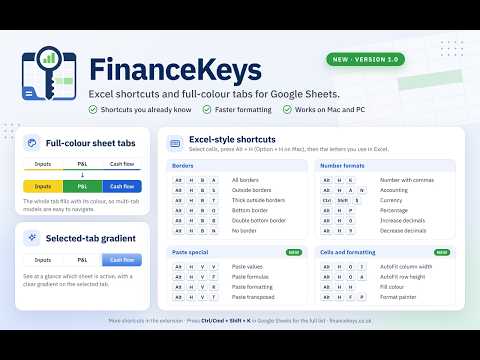
Use the Excel keyboard shortcuts you already know, in Google Sheets. FinanceKeys is built for finance professionals who model in Google Sheets: FP&A, accountants, bookkeepers, analysts, investment bankers and corporate finance teams. Select your cells, press Alt + H (Option + H on Mac), then the same letters you use in Excel. ★ BORDERS Alt + H + B + A: all borders Alt + H + B + S: outside borders Alt + H + B + T: thick outside borders Alt + H + B + O / P / L / R: bottom, top, left or right border Alt + H + B + B: bottom double border Alt + H + B + H: thick bottom border Alt + H + B + D / C / U: top and bottom, top and thick bottom, top and double bottom Alt + H + B + N: no border ★ NUMBER FORMATS Alt + H + K: number with commas Alt + H + A + N: accounting Ctrl + Shift + $: currency Alt + H + P: percent Alt + H + 0 / 9: increase or decrease decimal places ★ PASTE SPECIAL Alt + H + V + V: paste values Alt + H + V + F: paste formulas Alt + H + V + R: paste formatting Alt + H + V + T: paste transposed ★ CELLS AND FORMATTING Alt + H + O + I: AutoFit column width Alt + H + O + A: AutoFit row height Alt + H + H: fill colour Alt + H + F + P: format painter ★ FULL-COLOUR SHEET TABS Google Sheets shows tab colours as a thin line. FinanceKeys fills the whole tab with its colour, and the selected tab shows a gradient. You can find your place in a large model at a glance. HOW TO USE Select the cells you want to change. Hold Alt (Option on Mac) and press H. You can also tap Alt, release it, then press H. Press the remaining letters, as in Excel. On Windows, if Chrome opens its own menu when you press Alt + H, start with Ctrl + Alt + H. Forgot a shortcut? Press Ctrl + Shift + K (Cmd + Shift + K on Mac) in Google Sheets to see the full list. PRIVACY FinanceKeys runs in your browser on Google Sheets pages only. It does not collect, store, sell or transmit your spreadsheet contents. It needs no extra permissions. WORKS ON Chrome on Windows and Mac. FOUND A BUG? Email support@financekeys.co.uk. Tell us what you did and what happened, and we will address it. More at financekeys.co.uk
5 out of 52 ratings
Details
- Version1.0.0
- UpdatedOctober 12, 2026
- Size100KiB
- LanguagesEnglish (United Kingdom)
- DeveloperNicholas PerryWebsite
18A Stanbridge Road London SW15 1DX GBEmail
support@financekeys.co.ukPhone
+44 7714 645344 - TraderThis developer has identified itself as a trader per the definition from the European Union and committed to only offer products or services that comply with EU laws.
Privacy

FinanceKeys for Google Sheets has disclosed the following information regarding the collection and usage of your data. More detailed information can be found in the developer's privacy policy.
FinanceKeys for Google Sheets handles the following:
This developer declares that your data is
- Not being sold to third parties, outside of the approved use cases
- Not being used or transferred for purposes that are unrelated to the item's core functionality
- Not being used or transferred to determine creditworthiness or for lending purposes