


Overview
Create videos, demos, walkthroughs & guides that stay in sync with your product. Regenerate after a release instead of rebuilding.
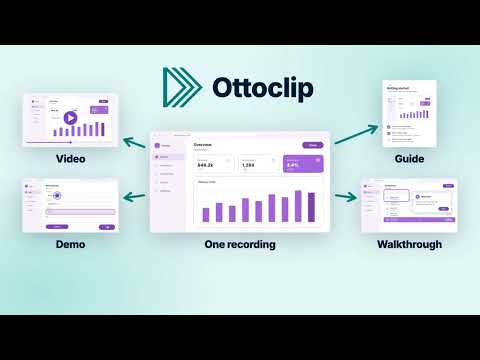
Ottoclip is the easiest way for companies with an online product to create narrated videos, interactive demos, walkthroughs, and guides that stay in sync with their product. Instead of spending days rebuilding content after every release, teams just regenerate it. Every release breaks your product content. Videos show old pages, demos fall a release behind, walkthroughs point at buttons that moved, and guides need new screenshots. Most teams rebuild each one by hand, in a separate tool for each format, after every release. Other tools record your product. Ottoclip understands it. The browser extension saves your product's pages, steps, and interactions in a content script (the saved steps and narration from your recording), not just screenshots and screen recordings. So when your product changes, you regenerate from it instead of re-recording. No coding and no video editing. If you can click through your product, you can use Ottoclip. HOW IT WORKS 1. Record once. Walk through a product flow with the browser extension, and Ottoclip drafts the narration from your actions. 2. Customize and generate. Edit the narration, pick a voice and colors, and generate every format from that one recording. 3. Regenerate after a release. When your product changes, generate again and every format updates, with no re-recording. WHAT YOU CAN CREATE 📽️ Narrated videos. A generated voiceover, a cursor and outline on each step, and text callouts when muted, so you skip video editing and post-production. 🖱️ Interactive demos. Prospects and users click through your product at their own pace, and unlisted or public demos need no sign-in. 📍 In-app walkthroughs. Guidance runs inside your own product and highlights which field to fill and which button to click, with a task list that checks off each step as users finish it. 📄 Step-by-step guides. Screenshot-and-text guides for your help center, with no screenshots to re-capture after a release. BUILT TO KEEP UP WITH YOUR PRODUCT ✅ Screenshots and video come from running your real product, so they match what your users see. 🔄 One regeneration updates every format of a content script at once, so you never rebuild the same flow in four places. 🔗 Share a link or embed public content on your site or help center. Links and embed codes stay the same after you regenerate, so nothing that points to your content needs updating. 🛠️ Broken steps fix themselves. Turn on automatic fixing, and regeneration repairs the steps a release broke, from a renamed button to a new required field, then holds each fix for your review. For a new feature, tell Fix with AI what changed or paste the pull request, and it adds the steps. AI repair beyond moved or renamed buttons, and Fix with AI, need a paid plan. GET STARTED Add Ottoclip to Chrome and start for free. No credit card required. Create your first content in as little as 15 minutes. Want help getting started? Book a demo at ottoclip.com. Depending on your product, we may be able to help set up your first content for its core features.
5 out of 51 rating
Details
- Version1.0.107
- UpdatedNovember 12, 2026
- FeaturesOffers in-app purchases
- Size386KiB
- LanguagesEnglish (United States)
- DeveloperCollectiveSoft, Inc.Website
808 Bauer Drive San Carlos, CA 94070 USEmail
support@ottoclip.comPhone
+1 650-241-8575 - TraderThis developer has identified itself as a trader per the definition from the European Union and committed to only offer products or services that comply with EU laws.
- D-U-N-S076204019
Privacy

Ottoclip has disclosed the following information regarding the collection and usage of your data. More detailed information can be found in the developer's privacy policy.
Ottoclip handles the following:
This developer declares that your data is
- Not being sold to third parties, outside of the approved use cases
- Not being used or transferred for purposes that are unrelated to the item's core functionality
- Not being used or transferred to determine creditworthiness or for lending purposes
Support
For help with questions, suggestions, or problems, please open this page on your desktop browser