


Overview
Productivity browser extension — tasks, focus mode, tab sessions, and quick capture.
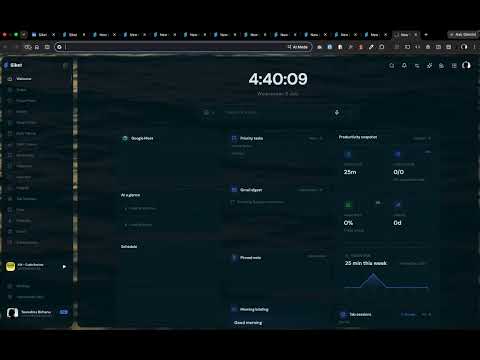
🚀 Siket — The AI-Powered Productivity Workspace Siket is an AI-powered productivity workspace that transforms your browser into a unified environment for work. Instead of switching between notes 📝, tasks ✅, bookmarks 🔖, calendars 📅, email ✉️, cloud storage ☁️, AI assistants 🤖, and dozens of browser tabs, Siket brings everything together into one intelligent workspace. Unlike standalone productivity applications, Siket serves as the operating layer for your digital workflow — connecting your tools, information, AI, and browser experience into a single workspace. Whether you're planning your day 🎯, capturing ideas 💡, researching 🔍, managing projects 📊, or protecting sensitive information 🔒, Siket helps you stay organized, focused, and in control of your digital environment. ✨ Key Features 🧩 Unified Workspace Create a personalized workspace with customizable widgets, layouts, and productivity tools designed around your workflow. Organize everything you need for work in one environment instead of constantly switching between different applications and browser tabs. 🌐 New Tab Experience Replace the default browser New Tab with a productivity-focused dashboard that gives you instant access to everything you need. Your workspace becomes the starting point for your browsing, tasks, knowledge, applications, and daily workflow. 🤖 AI Assistant An intelligent assistant that understands your workspace and helps you work with your information. Use AI to answer questions, summarize content, organize information, generate ideas, search your workspace, understand saved content, automate repetitive tasks, and assist with everyday workflows. 🧠 Smart Notes & Knowledge Base Capture ideas, notes, research, and important information in one place. Build a searchable personal knowledge base with AI-powered summaries, organization, and insights so your information becomes easier to find and use. ✅ Tasks, Focus & Habits Manage daily priorities, tasks, habits, and focus activities without leaving your browser. Create tasks, organize priorities, track habits, and structure your day around the work that matters. 🔎 Multi-Search Search across multiple sources from one place. Siket can provide a unified search experience across search engines, notes, bookmarks, saved content, and connected applications. 🔖 Smart Bookmarks & Read Later Save websites, articles, videos, documentation, and other resources into organized collections. Use AI-powered summaries and search to quickly understand and retrieve saved content when you need it. 🔗 Connected Applications Bring your existing tools into your Siket workspace. Connect services such as email, calendars, cloud storage, project management tools, development platforms, documents, and other productivity applications. Instead of managing each service separately, Siket provides a unified environment for accessing and working with your connected tools. 📌 Slide-Out Panels Access important tools instantly through side panels without interrupting your current browsing session. Open notes, tasks, AI, bookmarks, calendars, and other workspace tools while keeping your current page visible. ⌘ Command Palette Use ⌘K / Ctrl+K to control your workspace from your keyboard. Navigate your workspace, launch features, search information, execute commands, and access tools without constantly reaching for the mouse. 🗂️ Tab & Session Management Save, organize, restore, and manage browser tabs and sessions. Keep different projects, research sessions, and workflows organized instead of maintaining hundreds of open tabs. 🎨 Custom Widgets Build your workspace around the way you work. Add and customize widgets for notes, tasks, bookmarks, calendars, focus tools, habits, saved content, AI, productivity information, and connected services. 🔒 Workspace Lock Workspace Lock is an additional privacy and access-control layer for your browser workspace. It allows users to protect sensitive websites and services so they cannot simply be opened while the workspace is locked. Users can configure Siket to protect services such as Gmail, Outlook, private calendars, cloud storage, private documents, GitHub, account management portals, internal company tools, or any other sensitive website or domain. When Workspace Lock is active, protected websites cannot be accessed until the workspace is unlocked. This is not limited to focus sessions. Its primary purpose is privacy and protection from unauthorized access. For example, if you leave your computer unattended or someone else temporarily uses your browser, sensitive services such as email or private documents can remain protected even though the browser itself is still accessible. Workspace Lock provides an additional security layer on top of the browser and operating system. 🚫 Site Locker Site Locker gives users direct control over website access. Users can configure specific websites, domains, or categories that Siket should prevent from being accessed. For example, users can choose to protect email, messaging platforms, social media, development platforms, entertainment websites, internal company systems, sensitive account portals, or any custom domain. When a protected website is opened, Siket prevents access according to the user's configured rules. Site Locker is more than a traditional distraction blocker. It acts as a browser-level access-control layer, allowing users to decide which websites are accessible and which require authorization. 🔐 Privacy & Access Control Siket gives users greater control over their digital environment. Users can decide which websites are protected, which services require Workspace Lock, which domains are blocked, when protection is active, which resources require unlocking, and which applications are connected to Siket. The goal is to give users control over both their productivity environment and their digital privacy. 🔄 Cross-Device Synchronization Keep your workspace synchronized across devices. Synchronize workspaces, notes, tasks, bookmarks, settings, habits, saved content, productivity configurations, and website protection rules. Your environment follows you wherever you work. 🌟 Built for Modern Productivity Siket is designed for people who spend a significant part of their day in the browser. Modern work is fragmented across dozens of applications, websites, tabs, accounts, and services. Siket brings these pieces together into one intelligent browser-native workspace. Instead of constantly switching between applications, users can manage their work, information, AI, browsing, and digital environment from one place. And Siket goes beyond productivity. With Workspace Lock and Site Locker, users can also control access to sensitive parts of their digital environment — protecting private email, documents, accounts, development tools, and other websites from unauthorized access. Siket combines: 🧠 Knowledge + ✅ Productivity + 🤖 AI + 🌐 Browser + 🔗 Integrations + 🔒 Privacy + 🚫 Access Control into one unified workspace. Whether you're a student 🎓, creator 🎨, developer 💻, entrepreneur 🚀, or professional 👔, Siket provides one place to organize your work, manage your information, connect your tools, and control your digital environment. 🚀 Siket Your browser. Your workspace. Your AI. Your digital environment. Siket is not just another productivity application. It is the operating layer for your digital workflow.
5 out of 54 ratings
Details
- Version2.0.1
- UpdatedNovember 1, 2026
- Size5.93MiB
- LanguagesEnglish (United States)
- DeveloperWebsite
Email
hello@siket.app - Non-traderThis developer has not identified itself as a trader. For consumers in the European Union, please note that consumer rights do not apply to contracts between you and this developer.
Privacy

Siket has disclosed the following information regarding the collection and usage of your data. More detailed information can be found in the developer's privacy policy.
Siket handles the following:
This developer declares that your data is
- Not being sold to third parties, outside of the approved use cases
- Not being used or transferred for purposes that are unrelated to the item's core functionality
- Not being used or transferred to determine creditworthiness or for lending purposes
Support
For help with questions, suggestions, or problems, please open this page on your desktop browser