


Overview
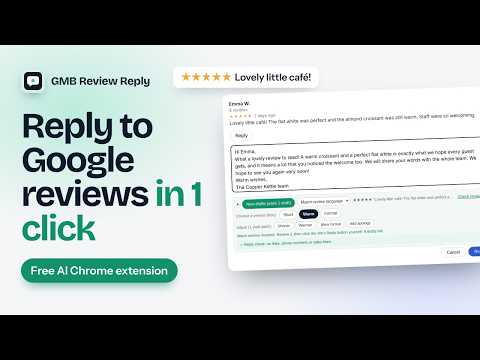
Reply to Google reviews with AI in Google's own reply box. 3 drafts in your voice and the reviewer's language. Free to start.
Reply to Google reviews with AI, right inside Google's own reply box. GMB Review Reply writes a review response for your Google Business Profile in seconds, in your business's voice and in the reviewer's language. It was built by a hotel owner, for hotels, restaurants, clinics, salons, shops and any local business that gets customer reviews. HOW IT WORKS 1. Set your business voice once: business name, greeting, tone, closing line and any extra instructions. 2. Open your reviews on Google Maps, in Google Search or at business.google.com and click Reply. 3. Click "Generate AI reply". Three drafts appear: Short, Warm and Formal. 4. Read the draft, edit it if you like, then click Reply yourself. WHAT YOU GET • Replies that answer what the customer actually wrote, not only the star rating • Your house style every time: greeting, tone, sign-off and rules such as "always apologise on bad reviews" • Greetings that suit your country, for example "Dear Sir" or "Dear Mam" for businesses in India • Replies in the reviewer's language, or pick a fixed language such as Hindi, Spanish or Arabic • Quick adjust buttons: Shorter, Warmer, More formal and Add apology • A reply check that warns you before you post if the text has a link, a phone number or a sales line • Told never to invent facilities, offers, refunds or contact details YOU STAY IN CONTROL • It never posts anything. You always click Reply yourself. • It never replaces text you typed without asking first. • It works only on Google Maps, Google Search and business.google.com, and only acts when a review reply box is open. YOUR DATA Nothing is sent until you click Generate or an Adjust button. Then only that one review goes to our server to write the draft: its text, star rating, the site name and reply language, plus the reviewer's name if your greeting uses it. Adjust buttons also send the reply text in the box. We do not store the review text, we delete drafts after 24 hours, and we never sell your data or use it for ads. Privacy policy: https://gmbreviewreply.com/privacy.html FREE AND PAID PLANS Start with 10 free drafts, then get 5 free drafts every month. No card needed. Paid monthly and yearly plans give more drafts and more business profiles, for single owners and agencies. Current prices: https://gmbreviewreply.com/#pricing Support: https://gmbreviewreply.com/support.html Guide: https://gmbreviewreply.com/how-to-reply-to-google-reviews.html GMB Review Reply is an independent product. It is not made, endorsed or sponsored by Google. Google, Google Maps and Google Business Profile are trademarks of Google LLC.
0 out of 5No ratings
Details
- Version1.0.7
- UpdatedNovember 24, 2026
- FeaturesOffers in-app purchases
- Size97.02KiB
- LanguagesEnglish
- DeveloperWebsite
Email
support@gmbreviewreply.com - Non-traderThis developer has not identified itself as a trader. For consumers in the European Union, please note that consumer rights do not apply to contracts between you and this developer.
Privacy

GMB Review Reply: AI Replies for Google Reviews has disclosed the following information regarding the collection and usage of your data. More detailed information can be found in the developer's privacy policy.
GMB Review Reply: AI Replies for Google Reviews handles the following:
This developer declares that your data is
- Not being sold to third parties, outside of the approved use cases
- Not being used or transferred for purposes that are unrelated to the item's core functionality
- Not being used or transferred to determine creditworthiness or for lending purposes
Support
For help with questions, suggestions, or problems, visit the developer's support site