

Gmail to PDF: Save Emails & Attachments

Overview
Save Gmail emails, threads, and attachments as PDF in bulk. Generated locally on your device—your email content is never uploaded.
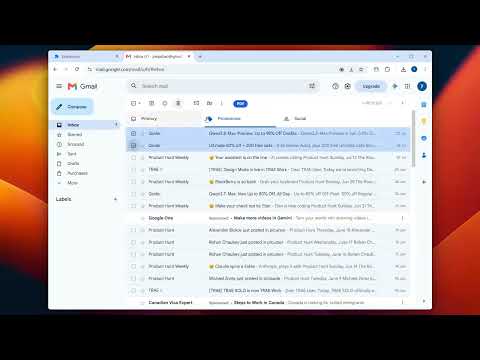
PDF My Email helps you save Gmail messages, complete email threads, and supported attachments as PDF files directly from Gmail. Select one or more emails, click the PDF button added to the Gmail toolbar, and follow the conversion progress. You can download separate PDF files, combine multiple messages into one PDF, or package PDFs and attachments in a ZIP archive. Key features: • Export selected Gmail emails and conversations as PDF • Batch export multiple emails from the current Gmail page • Save separate PDFs or combine emails into one PDF • Preserve printable email formatting and inline images • Download supported attachments together with exported emails • Package PDFs and attachments in a ZIP archive • Choose A3, A4, A5, B4, B5, Letter, Legal, or Tabloid paper sizes • Select portrait or landscape orientation • Configure margins, scale, page numbers, and quoted text • Customize downloaded filenames • View conversion progress for each email • Cancel an export and review completed or failed results • Use the extension interface in multiple languages Email bodies, inline images, attachments, and generated PDF files are processed locally in your browser and are not uploaded to PDF My Email servers. Google sign-in information, account status, subscription status, and export usage counts may be securely sent to PDF My Email services for authentication, quota management, billing, and account features. PDF My Email only processes emails that you explicitly choose to export. It does not automatically scan or back up your mailbox. PDF My Email is an independent product and is not affiliated with or endorsed by Google.
5 out of 51 rating
Details
- Version1.0.5
- UpdatedAugust 1, 2026
- FeaturesOffers in-app purchases
- Size1.1MiB
- Languages14 languages
- DeveloperWebsite
Email
zyacheng@gmail.com - Non-traderThis developer has not identified itself as a trader. For consumers in the European Union, please note that consumer rights do not apply to contracts between you and this developer.
Privacy

Gmail to PDF: Save Emails & Attachments has disclosed the following information regarding the collection and usage of your data. More detailed information can be found in the developer's privacy policy.
Gmail to PDF: Save Emails & Attachments handles the following:
This developer declares that your data is
- Not being sold to third parties, outside of the approved use cases
- Not being used or transferred for purposes that are unrelated to the item's core functionality
- Not being used or transferred to determine creditworthiness or for lending purposes
Support
For help with questions, suggestions, or problems, visit the developer's support site