


개요
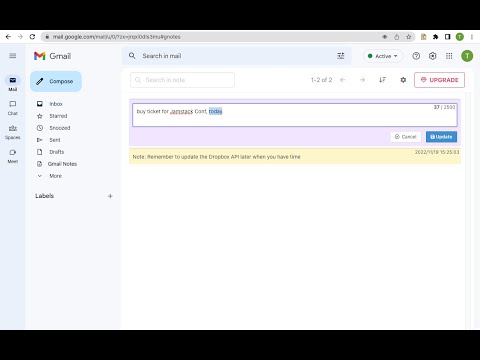
Add notes to Gmail. Manage notes in one place. Preview, search, re-edit, set colors, delete notes, navigate to related conversation.
Add notes to your Gmail, integrated with Gmail, you can quickly insert multiple notes to each conversation. Manage all your notes in one place. Preview notes, re-edit note, set note colors, navigate to related email conversations, or delete notes. Multiple notes can be inserted into each email conversation. If you have a better idea or changed your mind, just click the "Edit" button to modify your notes. New Features coming soon. Soon, you will be able to add notes when composing and replying to a conversion. and export all your notes to PDF. How are people using the extension? - Mark your important emails and collect them with well-organized "stickers". - Manage to-do lists, packing lists, and other important things from email conversations. - Take private notes for specific emails or conversations. It's very useful when you want to remember something from the email without forwarding it. - Write down your ideas about a subject or brainstorm for a project. - Clean up your thoughts or gather ideas when you compose a new email or reply to one. - Customer service staff can quickly search and copy templates from notes, only need to modify them slightly to send emails. More exciting ways to use it, waiting for you to discover... Please refer to the following link for the privacy policy https://www.workaddons.com/privacy
5점 만점에 3.4점평점 5개
세부정보
개인정보 보호

Gmail Notes - Quick Notes for Email에서 데이터 수집 및 사용과 관련하여 다음 정보를 공개했습니다. 더 자세한 정보는 개발자의 privacy policy을 참고하세요.
Gmail Notes - Quick Notes for Email 항목은 다음을 처리합니다.
개발자가 사용자 데이터에 관해 다음과 같이 선언했습니다
- 승인된 사용 사례를 제외하고 서드 파티에 판매하지 않음
- 항목의 핵심 기능과 관련 없는 목적으로 사용하거나 전송하지 않음
- 신용도 판단 또는 대출 목적으로 사용하거나 전송하지 않음
지원
질문, 제안 또는 문제와 관련하여 도움이 필요하면 데스크톱 브라우저에서 이 페이지를 여세요.