


Panoramica
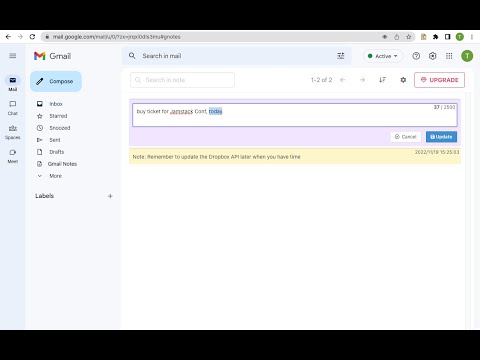
Add notes to Gmail. Manage notes in one place. Preview, search, re-edit, set colors, delete notes, navigate to related conversation.
Add notes to your Gmail, integrated with Gmail, you can quickly insert multiple notes to each conversation. Manage all your notes in one place. Preview notes, re-edit note, set note colors, navigate to related email conversations, or delete notes. Multiple notes can be inserted into each email conversation. If you have a better idea or changed your mind, just click the "Edit" button to modify your notes. New Features coming soon. Soon, you will be able to add notes when composing and replying to a conversion. and export all your notes to PDF. How are people using the extension? - Mark your important emails and collect them with well-organized "stickers". - Manage to-do lists, packing lists, and other important things from email conversations. - Take private notes for specific emails or conversations. It's very useful when you want to remember something from the email without forwarding it. - Write down your ideas about a subject or brainstorm for a project. - Clean up your thoughts or gather ideas when you compose a new email or reply to one. - Customer service staff can quickly search and copy templates from notes, only need to modify them slightly to send emails. More exciting ways to use it, waiting for you to discover... Please refer to the following link for the privacy policy https://www.workaddons.com/privacy
3,4 su 55 valutazioni
Dettagli
- Versione1.0.2
- Ultimo aggiornamento:2 settembre 2023
- Dimensioni2.88MiB
- LingueEnglish
- SviluppatoreSito web
Email
getworkaddons@gmail.com - Non commercianteQuesto sviluppatore non si è identificato come commerciante. Per quanto riguarda i consumatori nell'Unione Europea, tieni presente che i diritti del consumatore non sono applicabili ai contratti stipulati tra te e questo sviluppatore.
Privacy

Gmail Notes - Quick Notes for Email ha comunicato le seguenti informazioni relative alla raccolta e all'utilizzo dei tuoi dati. Per informazioni più dettagliate, consulta le privacy policy dello sviluppatore.
Gmail Notes - Quick Notes for Email gestisce quanto segue:
Questo sviluppatore dichiara che i tuoi dati:
- Non vengono venduti a terze parti, se non per i casi d'uso approvati.
- Non vengono usati o trasferiti per finalità non correlate alle funzionalità principali dell'elemento.
- Non vengono usati o trasferiti per stabilire l'affidabilità creditizia o per finalità di prestito.
Assistenza
Per ricevere assistenza in merito a domande, suggerimenti o problemi, apri questa pagina nel browser desktop