


Overview
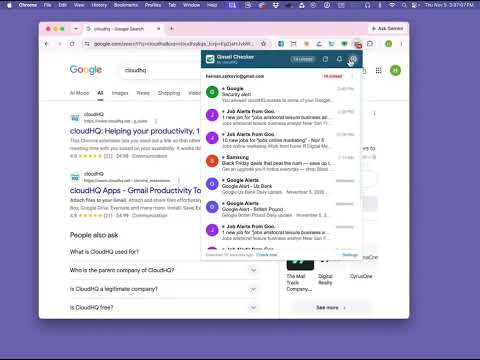
Unread badge, desktop alerts and a quick preview of new Gmail messages for all your accounts, without opening Gmail.
Do you keep a Gmail tab open just to see whether something new came in? Gmail Inbox Checker puts your inbox on the Chrome toolbar. The button shows how many unread emails you have, a desktop notification tells you the moment new mail arrives, and one click on the button previews the newest messages, all without opening Gmail. 📬 Unread count on the toolbar button, for every Google account you are signed in to in Chrome 🔔 Desktop notifications with the sender, the subject and the first line, or just "New email" if you prefer privacy 🔊 Your choice of sound and volume, how long a notification stays, and what a click on it opens 👀 A popup with the newest unread emails of every account: who wrote, the subject and the first line. Click an email to open it in Gmail, click the account to open that inbox 🔕 Quiet hours: pause for 30 minutes, an hour or until tomorrow, schedule quiet hours by day and time, and notifications pause by themselves while you present in fullscreen. The unread badge keeps updating 📄 Save any email as PDF with one click, through Save Emails to PDF by cloudHQ ⚡ Works with Gmail closed: no Gmail tab is needed ⚙️ Simple settings: five short sections, sensible defaults, light and dark theme, settings that follow your Chrome profile 💡 WHEN DOES THIS HELP? 🗂️ Several inboxes: a work account, a personal account and a side project. One badge counts them all, and the popup shows each inbox under its own address. 🎯 Closing Gmail to focus: keep Gmail closed while you work. Gmail Inbox Checker tells you when something new arrives and lets you decide whether it is worth opening. 🤝 Support and sales: a customer reply or a new lead shows up as a desktop notification within a minute, with the sender and the subject, so nobody waits on a refresh. 🎤 Presentations and meetings: notifications pause by themselves while you present in fullscreen, and quiet hours keep your evenings and weekends quiet. 🧾 Receipts and confirmations: hover an email in the popup and save it as a PDF without opening Gmail. 🚀 HOW IT WORKS 1. Install the extension and pin it to the Chrome toolbar. 2. Sign in with Google to create your cloudHQ account. Your 30-day free trial starts then, with every feature included. 3. That is all: it starts checking the Gmail accounts you are already signed in to. Click the button to preview new mail, right-click it for Options. 📌 NOTE: For easy access to your settings and other cloudHQ apps, look for the cloudHQ icon in the top right corner of your Gmail inbox. cloudHQ. Helping your productivity, 1 click at a time. cloudHQ website: https://www.cloudhq.net/ List of cloudHQ apps: https://www.cloudhq.net/apps App website: https://www.email-inbox-checker.com/ Pricing: https://www.email-inbox-checker.com/pricing Privacy policy: https://www.cloudhq.net/privacy Support page: https://support.cloudhq.net/category/browser-extensions/gmail-inbox-checker/ Blog: https://blog.cloudhq.net Gmail and Google Workspace are trademarks of Google LLC. Use of these trademarks is subject to Google Permissions. cloudHQ is trademark of CloudHQ LLC. https://www.cloudhq.net/trademark
0 out of 5No ratings
Details
- Version1.0.0.8
- UpdatedNovember 6, 2026
- Size781KiB
- Languages11 languages
- DevelopercloudHQ LLCWebsite
2247 29th Ave San Francisco, CA 94116-1738 USEmail
support@cloudhq.netPhone
+1 415-509-6721 - TraderThis developer has identified itself as a trader per the definition from the European Union and committed to only offer products or services that comply with EU laws.
- D-U-N-S064785518
Privacy

Gmail Inbox Checker: New Email Notifier by cloudHQ has disclosed the following information regarding the collection and usage of your data. More detailed information can be found in the developer's privacy policy.
Gmail Inbox Checker: New Email Notifier by cloudHQ handles the following:
This developer declares that your data is
- Not being sold to third parties, outside of the approved use cases
- Not being used or transferred for purposes that are unrelated to the item's core functionality
- Not being used or transferred to determine creditworthiness or for lending purposes
Support
For help with questions, suggestions, or problems, visit the developer's support site