

Play & Transcribe Voicemail in Gmail – Fix Audio Attachments

Overview
Play & transcribe voicemail in Gmail. WAV, GSM, AMR & VoIP supported. No downloads required.
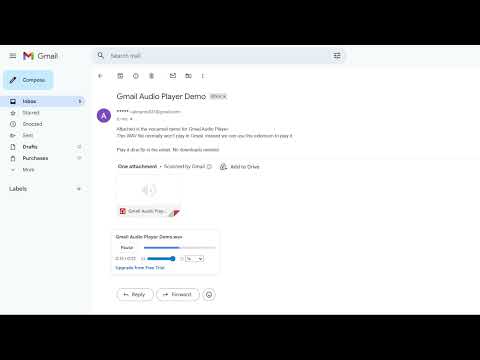
Play & Transcribe Voicemails Instantly in Gmail Gmail can't play most voicemail and audio attachments. If you're downloading every attachment just to hear a message, Gmail Audio Player fixes this — instant playback and AI transcription directly inside Gmail, no downloads, no external apps, no leaving your inbox. Trusted by medical receptionists, legal assistants, law firms, real estate agents, and professional teams who live in their inbox. ━━━━━━━━━━━━━━━━━━━━━━━ WHY GMAIL WON'T PLAY YOUR VOICEMAILS Gmail doesn't support the audio formats used by most phone carriers and VoIP systems — WAV (µ-law, A-law), GSM 6.10, AMR, and others. Gmail Audio Player decodes these formats directly in your browser and adds an inline player right inside Gmail. ━━━━━━━━━━━━━━━━━━━━━━━ HOW IT WORKS 1. Install and pin Gmail Audio Player 2. Open Gmail and find an email with a voicemail attachment 3. Press play — listen instantly without leaving Gmail No setup. No configuration. No Google account connection required. ━━━━━━━━━━━━━━━━━━━━━━━ SUPPORTED FORMATS WAV (µ-law, A-law), GSM 6.10, AMR, MP3, MP4 audio, WMA, and more. Covers all major telephony and VoIP voicemail formats. ━━━━━━━━━━━━━━━━━━━━━━━ FEATURES ▸ Inline audio player — play voicemails without downloading ▸ Scrub, pause, volume control, playback speed (0.5x–2x) ▸ AI transcription — convert voicemails to text instantly ▸ AI summary — one-line summary + action item per voicemail ▸ Team support — multiple staff on one company email domain ▸ Privacy-first — audio decoded locally, nothing uploaded ━━━━━━━━━━━━━━━━━━━━━━━ BUILT FOR PROFESSIONAL INBOXES If your phone system delivers voicemail by email, Gmail Audio Player handles it. Built for: - Medical receptionists and healthcare admin - Legal assistants and law firm staff - Real estate agents - Recruiters and HR teams - Sales teams and virtual assistants - Anyone who manages a voicemail-heavy inbox ━━━━━━━━━━━━━━━━━━━━━━━ TEAM & ORGANIZATION SUPPORT Enable multiple seats so all staff activate using their company email — no individual Stripe checkout per person. Email for pricing ━━━━━━━━━━━━━━━━━━━━━━━ PRICING Free trial — 10 voicemail plays, no account required Basic — $9.99/month, unlimited playback Pro — $15/month, unlimited playback + AI transcription (120 min/month) + AI summaries Business — $25/month, unlimited playback + AI transcription (600 min/month) + AI summaries ━━━━━━━━━━━━━━━━━━━━━━━ PRIVACY All audio decoding happens locally in your browser. No email content or attachments are uploaded to any server. No Google account connection required. ━━━━━━━━━━━━━━━━━━━━━━━ Gmail not playing audio attachments? Gmail voicemail not working? Can't play WAV or GSM files in Gmail? Install Gmail Audio Player and listen to your first voicemail in seconds.
5 out of 54 ratings
Details
- Version2.0.1
- UpdatedApril 6, 2026
- FeaturesOffers in-app purchases
- Size9.82MiB
- LanguagesEnglish
- DeveloperWebsite
Email
antman3112@gmail.com - Non-traderThis developer has not identified itself as a trader. For consumers in the European Union, please note that consumer rights do not apply to contracts between you and this developer.
Privacy

Play & Transcribe Voicemail in Gmail – Fix Audio Attachments has disclosed the following information regarding the collection and usage of your data. More detailed information can be found in the developer's privacy policy.
Play & Transcribe Voicemail in Gmail – Fix Audio Attachments handles the following:
This developer declares that your data is
- Not being sold to third parties, outside of the approved use cases
- Not being used or transferred for purposes that are unrelated to the item's core functionality
- Not being used or transferred to determine creditworthiness or for lending purposes
Support
For help with questions, suggestions, or problems, visit the developer's support site