


Overview
Generate and manage Gmail aliases using +tag addressing and presets
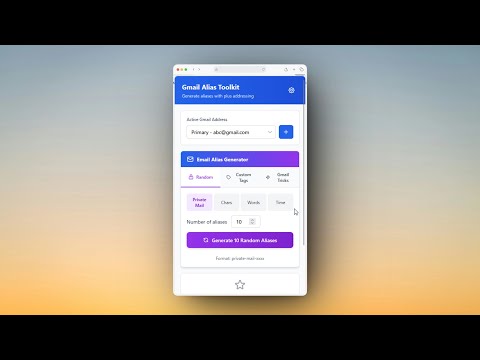
# 📧 Gmail Alias Toolkit A powerful browser extension for generating and managing Gmail aliases using plus addressing (+tag). Streamline your email workflow with random generators, custom presets, favorites, and comprehensive statistics. ## ✨ Features ### 🎯 Core Features - Random Alias Generator: Generate secure random aliases with multiple format options - Private Mail format (e.g., `private-mail-q2ga`) - Alphanumeric (e.g., `abc123xy`) - Random Words (e.g., `happy-fox-42`) - Timestamp-based (e.g., `lk9x2m3n`) - Custom Tags: Create aliases with your own custom tags - Gmail Tricks: Quick access to Gmail filtering and management tricks - Built-in Presets: Shopping, Work, Test, Social, Finance, Travel - Custom Presets: Create and manage unlimited preset tags with context menu integration - Favorites System: Star frequently used aliases for instant access - Recent Aliases: View, search, filter, and manage alias history with pagination - Multi-Account Support: Switch between multiple Gmail accounts seamlessly - Statistics Dashboard: Track usage with detailed analytics and insights - Badge Counter: Display alias count on extension icon (Total, Today, Week, or All-Time) ### 🎨 UI/UX Features - Modern Design: Clean, gradient-based interface with card layouts - Tabbed Interface: Organized main view with Random, Custom, and Gmail Tricks tabs - Pagination: Navigate through large alias histories (5-50 items per page) - Search & Filter: Real-time search and tag-based filtering - View Modes: Switch between Recent and Favorites views - Responsive: Optimized for 360px extension popup - Context Menu: Right-click integration for quick alias generation on any editable field ### ⚙️ Settings & Customization #### General Settings - Badge Counter: Choose what to display on extension icon - None (Hidden) - Total in History - Total Generated (All Time) - Created Today - This Week - Random Format: Select default format for random alias generation - Auto-save Limit: Set history size (20-500 aliases) - Theme: Light mode (Dark mode coming in next update) - Show Notifications: Toggle copy confirmation messages #### Account Management - Multi-Account: Add, edit, delete, and switch between Gmail accounts - Account Labels: Organize accounts with custom labels (Work, Personal, etc.) - Data Isolation: Each account has separate history, stats, and favorites - Quick Add: Add accounts directly from Settings with auto-complete - Email Migration: Change account email while preserving all data #### Custom Presets - Add unlimited custom preset tags - Synced with context menu automatically - Dynamic creation and deletion - Display with colored badges #### Data Management - Export Settings: Download all settings as JSON backup - Import Settings: Restore settings from backup file - Clear History: Remove all recent aliases for active account - Reset Settings: Restore all defaults with confirmation
5 out of 51 rating
Details
- Version1.3.3
- UpdatedJuly 31, 2026
- Size498KiB
- Languages14 languages
- DeveloperePlusWebsite
341/4F1 Lạc Long Quân Phường 5 Quận 11, Thành phố Hồ Chí Minh 700000 VNEmail
dev@eplus.dev - Non-traderThis developer has not identified itself as a trader. For consumers in the European Union, please note that consumer rights do not apply to contracts between you and this developer.
Privacy

This developer declares that your data is
- Not being sold to third parties, outside of the approved use cases
- Not being used or transferred for purposes that are unrelated to the item's core functionality
- Not being used or transferred to determine creditworthiness or for lending purposes
Support
For help with questions, suggestions, or problems, please open this page on your desktop browser