

Gmail AI Reply Helper
1 rating
)
Overview
Smart AI email replies for Gmail and text-to-speech for any website. Supports OpenAI, OpenRouter, and local Ollama models.
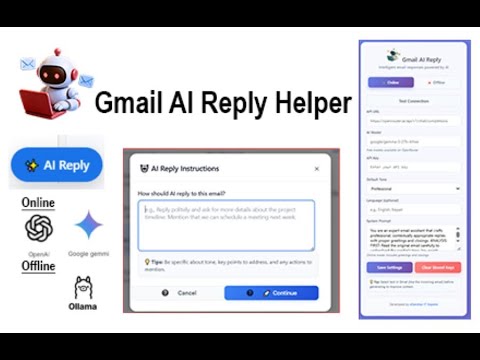
Gmail AI Reply Helper Smarter email replies & universal text-to-speech — all inside your browser Gmail AI Reply Helper helps you communicate faster, clearer, and more professionally by generating AI-powered email replies directly inside Gmail, along with text-to-speech and reading tools that work across websites. 💡 How it works Open or reply to an email in Gmail Click the ✨ AI Reply button Instantly receive a context-aware draft reply generated by your selected AI provider Review, edit, and send — you remain fully in control ⚡ Key Features 🤖 AI-Powered Email Replies Context-aware reply generation based on email thread content Maintains proper tone, greetings, clarity, and professionalism Multiple tone options: Professional, Friendly, Concise, Apologetic, Persuasive 🔊 Universal Text-to-Speech (NEW) Read Gmail emails aloud with a single click Select text on any website and hear it spoken Optional AI summarization for long emails Adjustable voice, speed, pitch, and volume Supports multiple languages using browser voices 🔁 Dual AI Mode Online Mode Use AI models via OpenAI or OpenRouter Compatible with GPT-4, Claude, Gemini, and more Offline Mode Use local Ollama models No internet required Complete privacy — all processing stays on your machine 🧠 Smart & Seamless Smart context recognition (conversation history, urgency, tone) Clean, non-intrusive Gmail integration Works with modern web apps (Gmail, Facebook, and more) Keyboard shortcuts for faster access 🔒 Privacy First No data collection No background servers API keys and settings are stored locally in your browser only Offline mode ensures 100% local AI processing 🔑 Requirements Google Chrome browser Gmail account Either: An API key (OpenAI / OpenRouter) or Ollama installed for offline AI ✅ Free to use Bring your own API key or use offline models with Ollama — no subscriptions required. 👉 Save time, stay professional, and upgrade your email workflow with Gmail AI Reply Helper. Note: This extension does not collect, store, or transmit user data to any external server. Email content is sent only to the selected AI provider when generating replies (or processed locally with Ollama). The developer has no access to user data, API keys, or email content.
5 out of 51 rating
Details
- Version1.1.0
- UpdatedJanuary 13, 2026
- Offered bytechnicguy
- Size86.45KiB
- LanguagesEnglish
- DeveloperAkash Bahadur G C
Email
info@esanshar.com.npPhone
+977 984-4707950 - TraderThis developer has identified itself as a trader per the definition from the European Union and committed to only offer products or services that comply with EU laws.
Privacy

Gmail AI Reply Helper has disclosed the following information regarding the collection and usage of your data. More detailed information can be found in the developer's privacy policy.
Gmail AI Reply Helper handles the following:
This developer declares that your data is
- Not being sold to third parties, outside of the approved use cases
- Not being used or transferred for purposes that are unrelated to the item's core functionality
- Not being used or transferred to determine creditworthiness or for lending purposes
Support
For help with questions, suggestions, or problems, please open this page on your desktop browser