

AI-помощник для Gmail – Mailmeteor

Обзор
Входящие, которые помогают навести порядок, писать ответы в вашем стиле и держать переписку под контролем.
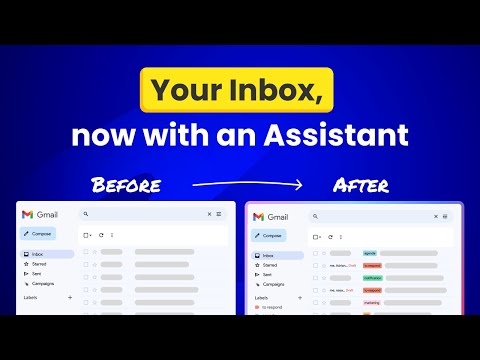
Mailmeteor's AI Email Assistant helps you save hours every day in your inbox. It brings powerful features to your Gmail, such as: 🏷️ Organize your inbox to help you focus 📝 Drafts replies ready to send 💌 Mail merge directly from Gmail ⏰ Follow up automatically until you get a reply ✔ Email tracker to know when your emails are opened 🗂️ Search and export emails in one click Most features are free to use. Upgrade to send more emails, get additional AI credits, and access advanced features, like email tracking, attachments, Autopilot, and more. WHY MAILMETEOR? - Best-rated add-on for Gmail - 7 million users on Google Sheets, rated 4.9/5 - Trusted by teams at Spotify, Uber, Pinterest, Shopify, and Change.org - Recommended by Google This extension works exclusively in Gmail, where your work happens. No need to add extra tools or switch to a different dashboard or SaaS. MAILMETEOR BENEFITS ➤ AI Email Assistant, including email categorization, drafts replies, email writer, and more. ➤ Email Tracker to know when your emails are opened or clicked ➤ Mail merge inside Gmail ™. We maximize your email deliverability and send emails directly from Gmail ™. ➤ Follow up with ease in Gmail ™. Send automated follow-ups in one click, without your recipients knowing. ➤ Designed to respect your privacy. FEATURES ✓ AI Email Assistant built into Gmail ✓ Mail merge, with analytics ✓ Email Tracker (opens and clicks) ✓ Auto follow-up: send a reminder when not opened, not replied… ✓ Bounces detection: make sure you don’t follow up to dead email addresses ✓ Hubspot / CRM integration ✓ CSV emails export ✓ Available in English HOW TO USE AI EMAIL ASSISTANT IN GMAIL? Once you've installed this extension, you'll be invited to enable AI Email Assistant features immediately. Alternatively, you can enable it by following these steps: 1. Access the Settings > Add-ons > Mailmeteor settings 2. Turn on the AI Email Assistant feature 3. Fine-tune the email categorization, pre-drafts, and other settings. Once enabled, your AI Email Assistant will: - organize your inbox, with smart labels - draft replies to important emails (to respond) - help you write emails faster HOW TO MAIL MERGE IN GMAIL? Once you've installed this extension, here's how to send mass emails in your Gmail inbox: 1. Select the "Campaigns" tab, underneath Inbox / Starred / Sent 2. Click on "New campaign" 3. Write your email and select recipients 4. Once you're ready, send yourself a test email or preview 5. Click "Send emails" Your recipients will receive the emails just as you would have sent them, and your emails remain accessible in the "Sent" tab of your Gmail account. HOW TO FOLLOW UP IN GMAIL? Once you’ve installed this extension for Gmail, here’s how to follow up in Gmail: 1. Compose a new message as usual 2. Instead of clicking on “Send”, click on the caret and select “Send with a follow-up” 3. Select a follow-up template or write a new message 4. Define when the follow-up should be sent (e.g. 3 days later, if no reply) 5. Click send SUPPORT AND DOCUMENTATION Need help? Check our support center: https://mailmeteor.com/docs/ You will learn: ⚑ The best time to follow up with a prospect ⚑ A wide selection of email templates ⚑ Gmail best practices to improve your deliverability And also, everything you need to know before doing a mass mailing in Gmail ™, such as: ⚑ How to send mass emails in Gmail ™ ⚑ How to send mass customized emails with Gmail ™ ⚑ How to send a mass email without showing addresses in Gmail ™ ⚑ How to use your Gmail ™ contact list to send emails ⚑ Why Mailmeteor is better than Gmass, Lemlist, Yamm, Streak and Mailsuite *** FREE FOR EDUCATION Have a .EDU email address? Mailmeteor provides free licenses for students and staff, as part of its Education Program. Learn more: https://mailmeteor.com/education-program USE GMAIL AS A SUPERHUMAN Mailmeteor turns your Gmail inbox into a complete email marketing solution: ✪ Follow up with ease to make sure your recipients reply ✪ Templates to reuse your best follow-up messages ✪ Skip following up when the recipient replies ✪ Bounce detection: remove invalid email addresses ✪ Mailmeteor Dashboard to do even more with your emails POPULAR USE CASES You can use Mailmeteor in many different ways. Here are some examples: ➤ Sales & Marketing: to boost your conversion and re-engage your leads at scale ➤ Customer care: to make sure a ticket is closed ➤ Finance: to put an end to unpaid invoices ➤ Marketing: personalized thank-you emails to HR recruiters, crowdfunding supporters, Product Hunt, business angels, friends & family. ➤ Job hunt: follow-up after an interview and make sure the recruiter doesn’t forget about you ➤ PR: Bump your email to the top of journalists' or influencers' inboxes. ➤ Email No Code: follow up with prospects without a line of code ➤ Events: Inviting people to an event (webinar, wedding, job-dating, fair, conference, meetup...) and reducing no-shows by sending a reminder shortly before the event. *** SHARE FEEDBACK Here are the features we have built thanks to your feedback: ✓ Send newsletters in Gmail ✓ Multi follow-ups & email sequence ✓ Follow-up with images & attachments ✓ Templates management to write emails faster ✓ Open & Click Tracking ✓ More follow-up triggers, such as open/no-open ✓ Cold emailing & Mail merge in Gmail Still think we could do better? Suggest a missing feature: https://mailmeteor.com/contact#others/features-request *** PRIVACY & SECURITY Mailmeteor complies with privacy laws (especially GDPR) to protect your data. Learn more about how we respect your privacy in our Privacy Policy in our Security center: https://mailmeteor.com/security Mailmeteor is audited by Google every year for optimal security. We're CASA Tier 3 compliant, with SOC 2 certification in progress. *** Gmail and Google are trademarks of Google Inc. Use of these trademarks is subject to Google permissions. *** WEBSITE: https://mailmeteor.com SUPPORT: https://mailmeteor.com/docs/ CONTACT US: https://mailmeteor.com/contact
4,7 из 5156 оценок
Подробности
- Версия2.18.1
- Обновлено28 мая 2026 г.
- ВозможностиЕсть платный контент.
- Размер3.8MiB
- ЯзыкиПоддерживаемых языков: 14
- РазработчикMailmeteorСайт
43 Boulevard Auguste Blanqui Paris 75013 FRЭлектронная почта
support@mailmeteor.comТелефон
+33 6 60 33 40 84 - ПродавецЭтот разработчик заявил, что является продавцом согласно определению Европейского Союза, и взял на себя обязательство предлагать только товары и услуги, соответствующие законодательству ЕС.
- D-U-N-S272937206
Конфиденциальность

Разработчик "AI-помощник для Gmail – Mailmeteor" предоставил указанные ниже сведения о сборе и использовании ваших данных. Подробную информацию вы найдете в правилах разработчика: privacy policy.
В продукте "AI-помощник для Gmail – Mailmeteor" обрабатываются следующие типы данных:
Этот разработчик утверждает, что ваши данные:
- Не продаются третьим лицам, за исключением разрешенных вариантов использования
- Не используются и не передаются в целях, не связанных с работой основных функций продукта
- Не используются и не передаются для определения платежеспособности или в целях кредитования
Поддержка
Сообщить об ошибках в работе приложения, задать вопрос или поделиться идеями можно на сайте разработчика.