


Overview
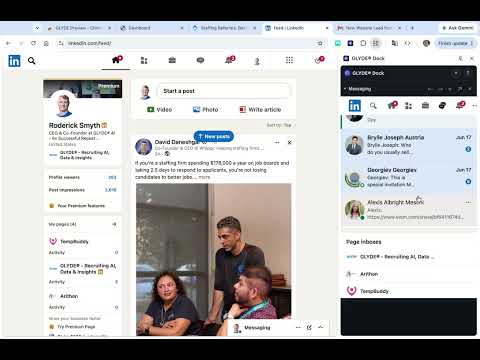
Keep your most frequently used tools and pages always available inside a side-by-side side panel (up to 3 active tools at once).
Stop losing your place in a dozen tabs. GLYDE® Dock keeps the tools you use all day — your ATS, LinkedIn, ChatGPT, your inbox, your notes — pinned side-by-side in the browser side panel, so you finish the task instead of hunting for the tab. Recruiters spend most of the day copy-pasting between five or more tools. Every tab switch is a lost thought and a half-typed message. GLYDE® Dock ends the shuffle: hold a hotkey, click a link, and it docks right next to whatever you're working on — your main tab never moves. *** HOW TO USE IT *** 1. Hold Alt + Shift (Option + Shift on macOS). 2. Click any link on a page to dock it in the side panel. 3. The panel slides open and keeps your tool live in an accordion section — up to 3 at once. Or click the GLYDE® Dock icon to open your workspace any time. *** WHAT YOU GET *** * Three tools, one glance: Keep up to 3 live, scrollable tools open together. Resize, collapse, and reorder them without losing scroll position or your place on the main page. Dock even remembers which sections you had open across browser restarts. * One-click setups: Start your day in one move. The Recruiter, Developer, and Finance setups each open a ready-made stack of the right tools. * Picks up where you left off: With your permission, Dock suggests your most-visited sites from the last two weeks so your workspace is ready before you build it. Your history never leaves your device. * Type-and-go shortcuts: The + bar autocompletes the things you reach for — calendars, Indeed, stock tickers, Spotify, a calculator, and more. * Pull your tab in: With the cursor in a docked tool, press Alt+V (Option+V on macOS) to drop in the page you're on, or Shift+Alt+V to drop in its text — no copy-paste tab dance. * Dock the tab you're on: A single click on the header button docks the URL of your current tab into the panel. * A notepad that's always there: Jot, paste, and copy in an auto-saving scratchpad — code blocks and pasted images included — without opening another app. You'll see a "Saved ✓" the moment your note lands. * Built for a narrow panel: Docked sites load their mobile layout where they offer one, so they actually fit. When a site refuses to embed, Dock names it and points you to a one-click open in a full tab — or offers a mobile-version retry. * Opens when you do: Optionally get a badge and a single desktop notification when Chrome starts, so the dock is ready the moment you sit down to work. *** BUILT TIGHT, BY DEFAULT *** * Smallest practical permission set on install. History access and clipboard read are asked for in-context, the first time you use the feature that needs them — never upfront. * Header modifications (the trick that lets stubborn sites embed in the panel) apply ONLY to this extension's own dock iframes, never to your other tabs. * No remote code. No tracking. No data collection. Everything runs on your device. *** WHO IT'S FOR *** * Recruiters keeping their ATS, LinkedIn, and ChatGPT side-by-side instead of in ten tabs. * Researchers comparing sources without losing their reading spot. * Developers keeping docs and references one glance away. * Anyone done fighting tab clutter. Open your tools side-by-side and keep your focus where it belongs. Add GLYDE® Dock and dock your first tool in seconds. Requires Chrome 116 or later (for Side Panel API support).
5 out of 51 rating
Details
- Version2.3.1
- UpdatedOctober 9, 2026
- Size307KiB
- LanguagesEnglish (United States)
- DeveloperGlyde IncWebsite
8 The Green Suite R Dover, DE 19901 USEmail
services@glydetalent.comPhone
+1 609-316-7601 - TraderThis developer has identified itself as a trader per the definition from the European Union and committed to only offer products or services that comply with EU laws.
Privacy

This developer declares that your data is
- Not being sold to third parties, outside of the approved use cases
- Not being used or transferred for purposes that are unrelated to the item's core functionality
- Not being used or transferred to determine creditworthiness or for lending purposes
Support
For help with questions, suggestions, or problems, please open this page on your desktop browser