Item logo image for Glowsary: Build Your Vocabulary as You Read Online

Glowsary: Build Your Vocabulary as You Read Online

5.0(

4 ratings

)
Item media 6 (screenshot) for Glowsary: Build Your Vocabulary as You Read Online
Item video thumbnail
Item media 2 (screenshot) for Glowsary: Build Your Vocabulary as You Read Online
Item media 3 (screenshot) for Glowsary: Build Your Vocabulary as You Read Online
Item media 4 (screenshot) for Glowsary: Build Your Vocabulary as You Read Online
Item media 5 (screenshot) for Glowsary: Build Your Vocabulary as You Read Online
Item media 6 (screenshot) for Glowsary: Build Your Vocabulary as You Read Online

Overview

Highlight your saved vocabulary across the web and reveal your own definitions on demand.

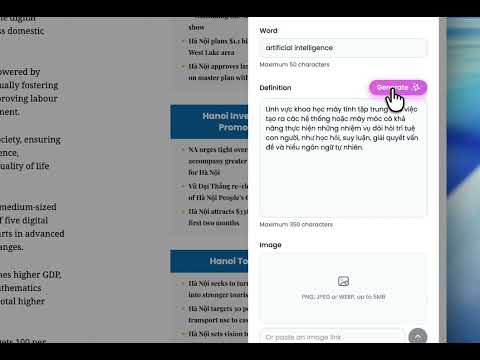
Glowsary turns the web into your personal vocabulary notebook. When you read in English and look up a word, you save it once with your own meaning, or let AI draft a short definition for you in a tap. You can also add a picture to help it stick. After that, Glowsary quietly underlines that word everywhere it appears as you browse, and shows your saved definition in a small popup when you hover over it. It works like Word Wise on a Kindle, except the words are the ones you chose, and the meaning stays hidden until you ask for it. What you can do: - Save any word or phrase while you read. Select the text, right-click, and choose “Add word”, then type your own definition. You can also add a word by hand without selecting anything. - Let AI write the first draft for you. Press Generate and Glowsary writes a short definition for the word, in English or Vietnamese. It fills the field for you, and you can edit it before saving. Want to use your own Gemini API key? You can add it in Settings. - Add a picture to any word. Import an image from your computer or paste an image link, so a visual cue helps the word stick alongside your definition. - Recognize your words again everywhere. Saved words get a subtle underline on every site, so you notice them on sight. - Read without interruption. The definition shows only when you hover, then gets out of your way. - Keep more than one meaning for the same word. When a word has several saved meanings, the popup pages through them. - Hear how a word sounds. Click the speaker icon in the popup or on a word card to hear it spoken aloud. - Color your words. Tag each saved word with one of four colors to group and tell them apart at a glance. - Add alternate forms with aliases, so “version” and “versions” share one definition. - Stay in control. Turn highlighting on or off anytime, and exclude any site where you do not want it. - Manage everything in one place. Search, sort, edit, and delete your words, add words by hand, and export or import your list as a JSON backup. - Private by design. Everything is stored on your own device. No account, no sign-in, and your words never leave your computer. Glowsary is made for self-learners who read English online and want the effort of every lookup to stick.

Details

  • Version
    1.6.0
  • Updated
    July 3, 2026
  • Offered by
    khoasdyn
  • Size
    449KiB
  • Languages
    English (United States)
  • Developer
    Email
    khoasdyn@gmail.com
  • Non-trader
    This developer has not identified itself as a trader. For consumers in the European Union, please note that consumer rights do not apply to contracts between you and this developer.

Privacy

Manage extensions and learn how they're being used in your organization

Glowsary: Build Your Vocabulary as You Read Online has disclosed the following information regarding the collection and usage of your data. More detailed information can be found in the developer's privacy policy.

Glowsary: Build Your Vocabulary as You Read Online handles the following:

Website content

This developer declares that your data is

  • Not being sold to third parties, outside of the approved use cases
  • Not being used or transferred for purposes that are unrelated to the item's core functionality
  • Not being used or transferred to determine creditworthiness or for lending purposes

Related

Vocab-Bucket

0.0

Lets users save highlighted words on a web page and automatically fetch their meanings

My Vocabulary Tracker

0.0

Double-click any word on the web to see its meaning and add it to your vocabulary.

Wordboox

0.0

Save words as you read. Get AI definitions, highlight vocabulary, and keep personal notes in your synced wordbook.

Dictionary Dad

5.0

Double-click any word for its definition. Save, highlight, and master vocabulary with spaced repetition.

WordWise - Offline Dictionary & Vocabulary Builder

5.0

Instant offline vocabulary lookup: definitions, synonyms, and more on any page.

Word Stash

5.0

Save words from any webpage with their meanings.

ABC Words Saver

3.0

Capture any words and phrases from the web. Simple, quick, and designed for seamless learning. Save now, Learn anytime!

WordySpot: English Vocabulary Finder

0.0

Scans visible page text locally to find English words you may want to learn, explain them, and save them to your WordySpot lists.

HoldMyWord: Vocabulary Builder & Dictionary

5.0

Double-click any word to save it with a simple definition in your language and an example. Build your vocabulary in any language.

Total Vocab Collector - Save English Words to Notion

5.0

Collect English words from any webpage and save their definitions and examples to your Notion database.

Vocabify

0.0

Highlight and save words with definitions.

VocabMint

0.0

Translate words, save vocabulary, and see words you've already learned highlighted across the web.

Vocab-Bucket

0.0

Lets users save highlighted words on a web page and automatically fetch their meanings

My Vocabulary Tracker

0.0

Double-click any word on the web to see its meaning and add it to your vocabulary.

Wordboox

0.0

Save words as you read. Get AI definitions, highlight vocabulary, and keep personal notes in your synced wordbook.

Dictionary Dad

5.0

Double-click any word for its definition. Save, highlight, and master vocabulary with spaced repetition.

WordWise - Offline Dictionary & Vocabulary Builder

5.0

Instant offline vocabulary lookup: definitions, synonyms, and more on any page.

Word Stash

5.0

Save words from any webpage with their meanings.

ABC Words Saver

3.0

Capture any words and phrases from the web. Simple, quick, and designed for seamless learning. Save now, Learn anytime!

WordySpot: English Vocabulary Finder

0.0

Scans visible page text locally to find English words you may want to learn, explain them, and save them to your WordySpot lists.

Google apps