

Glowsary: Build Your Vocabulary as You Read Online
4 ratings
)
Overview
Highlight your saved vocabulary across the web and reveal your own definitions on demand.
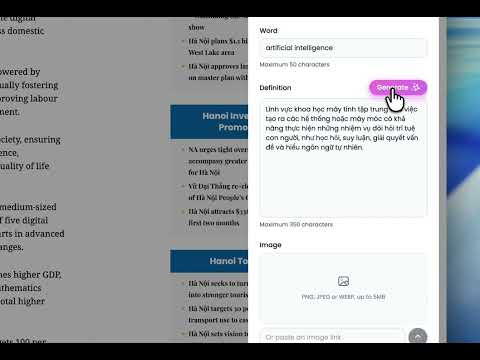
Glowsary turns the web into your personal vocabulary notebook. When you read in English and look up a word, you save it once with your own meaning, or let AI draft a short definition for you in a tap. You can also add a picture to help it stick. After that, Glowsary quietly underlines that word everywhere it appears as you browse, and shows your saved definition in a small popup when you hover over it. It works like Word Wise on a Kindle, except the words are the ones you chose, and the meaning stays hidden until you ask for it. What you can do: - Save any word or phrase while you read. Select the text, right-click, and choose “Add word”, then type your own definition. You can also add a word by hand without selecting anything. - Let AI write the first draft for you. Press Generate and Glowsary writes a short definition for the word, in English or Vietnamese. It fills the field for you, and you can edit it before saving. Want to use your own Gemini API key? You can add it in Settings. - Add a picture to any word. Import an image from your computer or paste an image link, so a visual cue helps the word stick alongside your definition. - Recognize your words again everywhere. Saved words get a subtle underline on every site, so you notice them on sight. - Read without interruption. The definition shows only when you hover, then gets out of your way. - Keep more than one meaning for the same word. When a word has several saved meanings, the popup pages through them. - Hear how a word sounds. Click the speaker icon in the popup or on a word card to hear it spoken aloud. - Color your words. Tag each saved word with one of four colors to group and tell them apart at a glance. - Add alternate forms with aliases, so “version” and “versions” share one definition. - Stay in control. Turn highlighting on or off anytime, and exclude any site where you do not want it. - Manage everything in one place. Search, sort, edit, and delete your words, add words by hand, and export or import your list as a JSON backup. - Private by design. Everything is stored on your own device. No account, no sign-in, and your words never leave your computer. Glowsary is made for self-learners who read English online and want the effort of every lookup to stick.
5 out of 54 ratings
Details
- Version1.6.0
- UpdatedJuly 3, 2026
- Offered bykhoasdyn
- Size449KiB
- LanguagesEnglish (United States)
- Developer
Email
khoasdyn@gmail.com - Non-traderThis developer has not identified itself as a trader. For consumers in the European Union, please note that consumer rights do not apply to contracts between you and this developer.
Privacy

Glowsary: Build Your Vocabulary as You Read Online has disclosed the following information regarding the collection and usage of your data. More detailed information can be found in the developer's privacy policy.
Glowsary: Build Your Vocabulary as You Read Online handles the following:
This developer declares that your data is
- Not being sold to third parties, outside of the approved use cases
- Not being used or transferred for purposes that are unrelated to the item's core functionality
- Not being used or transferred to determine creditworthiness or for lending purposes