

GlowReadTTS - Text to Speech Voice Reader
1 rating
)
Overview
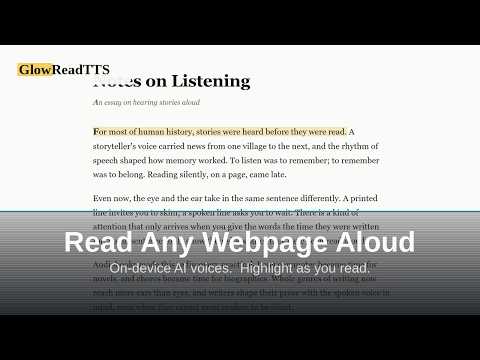
On-device AI voices read selected text aloud with highlight-as-you-read. Fully offline. No accounts, no tracking.
Free text to speech for Chrome. Read aloud any webpage, article, or selected text with natural AI voices that run entirely on your device. No account, no API key, no subscription, no internet connection required. Highlight text, right-click, and listen. This TTS voice reader highlights every sentence on the page as it is spoken, so you can follow along while you listen. Built for people who read a lot. Articles, research papers, study material, documentation, long emails, newsletters, anything you would rather listen to than read. WHY GLOWREADTTS Natural AI voices, not robotic ones. A neural text-to-speech model runs locally in your browser, so the voices sound like a person reading rather than a screen reader from 2005. Works completely offline. The voice model ships inside the extension. Disconnect from the internet and it still reads aloud. Nothing is downloaded after install, and nothing is uploaded ever. Genuinely free. No trial, no premium tier, no character limit, no monthly quota. Most text to speech extensions send your text to a paid cloud API and charge you for it. This one does not. FEATURES - 15 natural neural voices across American and British English - Right-click any selected text to hear it read aloud - Highlight-as-you-read with automatic scrolling to follow along - On-page pause and stop buttons so you can control a read without opening the popup - Keyboard shortcuts to read or pause, which you set in Chrome's shortcuts page - Type or paste text directly into the popup - Adjustable reading speed from 0.25x to 2x - Test any voice before choosing it - Pause, resume, and restart, and audio keeps playing when the popup closes GOOD FOR - Turning long articles and reports into something you can listen to like an audiobook - Listening to news articles and long-form writing while doing other things - Studying, revision, and reading research papers - Proofreading your own writing by ear - Resting your eyes during long reading sessions - Language learners following written text while hearing it spoken - Anyone who absorbs information better by listening PRIVACY The extension makes zero network requests during normal operation. - Your text never leaves your computer - No analytics, no telemetry, no tracking - No browsing history or URLs collected - No accounts, no sign-up, no email - Nothing sent to any server, ever Speech is generated on your own device using WebAssembly. There is no cloud API behind this, which is why it works offline and why it stays free. Open source under the GNU General Public License v3. The code is public and auditable at github.com HOW TO USE 1. Highlight text on any webpage 2. Right-click the selection 3. Choose "Read with GlowReadTTS" Or click the toolbar icon to type or paste text directly. Free forever. No accounts, no subscriptions, no ads.
5 out of 51 rating
Details
- Version1.2.0
- UpdatedOctober 10, 2026
- Offered byLavelle Hatcher Jr
- Size72.83MiB
- LanguagesEnglish
- Developer
Email
lj4ai.expansion085@passmail.com - Non-traderThis developer has not identified itself as a trader. For consumers in the European Union, please note that consumer rights do not apply to contracts between you and this developer.
Privacy

This developer declares that your data is
- Not being sold to third parties, outside of the approved use cases
- Not being used or transferred for purposes that are unrelated to the item's core functionality
- Not being used or transferred to determine creditworthiness or for lending purposes
Support
For help with questions, suggestions, or problems, visit the developer's support site