

GlowMarkr
2 ratings
)
Overview
Persistent text highlighter with comments.
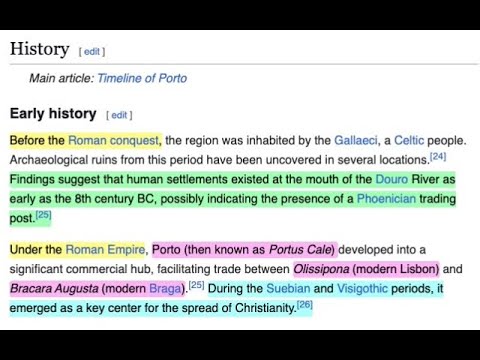
✨ GlowMarkr: Your Digital Highlighter & Notetaker ✨ Ever wish you could highlight text on websites and have it actually stay there? Meet GlowMarkr, your new bestie for studying, research, or just remembering that hilarious meme you saw. 📝 GlowMarkr lets you highlight text on any webpage, and it magically remembers your highlights the next time you visit. You can even add comments to your highlights! No more losing your spot or taking a million screenshots. It's like having digital sticky notes that never fall off. 📌 --- 🚀 How to Use It 🚀 * Highlighting: 1. Select text: Just drag your mouse over anything you want to remember. 2. Right-click: A menu will pop up. 3. Choose your color: Select one of the color options (e.g., "🟡 Yellow", "🟢 Green", "🌸 Pink", "🔵 Cyan"). Your text is now highlighted! 💥 * Commenting: 1. Right-click on any highlight. 2. Select "Comment 📝". 3. Add your note in the popup and save. A pencil icon will appear next to your highlight! 4. Click on the pencil icon to see your note! 💬 * Unmarking: 1. Right-click on the highlight you want to remove. 2. Select "Unmark". The highlight and its comment will be deleted. ✨ --- 🧠 It Just *Knows* 🧠 The next time you open a page, GlowMarkr automatically re-applies all your highlights and comment icons. It's perfect for: * 📚 Studying: Keep track of key points in online articles. * 🛍️ Shopping: Highlight features of products you're comparing. * 📖 Reading: Mark your favorite quotes or important passages. --- 💖 Why You'll Love It 💖 * Super simple: No complicated settings or buttons. * Persistent: Your highlights and comments are saved automatically and are there when you come back. * It's free! --- ⚠️ A Quick Heads-Up ⚠️ GlowMarkr works best on pages with static content, like articles, blog posts, and documentation. It may not work as expected on highly dynamic websites where the content changes frequently (e.g., Facebook, Gmail, Reddit). --- ⭐ Your Feedback Matters! ⭐ If you find GlowMarkr useful, please consider giving it a 5-star rating! If you encounter a bug, please open an issue on our GitHub page before leaving a low rating. We're committed to making GlowMarkr better, and your feedback is crucial for that. Open issues here: https://github.com/davidraviv/chrome-glowmarkr/issues Happy highlighting! 🎉
5 out of 52 ratings
Details
- Version0.4.3
- UpdatedDecember 3, 2025
- Offered byDavid Raviv
- Size30.82KiB
- LanguagesEnglish
- Developer
Email
david@raviv.co - Non-traderThis developer has not identified itself as a trader. For consumers in the European Union, please note that consumer rights do not apply to contracts between you and this developer.
Privacy

This developer declares that your data is
- Not being sold to third parties, outside of the approved use cases
- Not being used or transferred for purposes that are unrelated to the item's core functionality
- Not being used or transferred to determine creditworthiness or for lending purposes
Support
For help with questions, suggestions, or problems, visit the developer's support site