Item logo image for glossa: learn while watching Netflix and Prime Video

glossa: learn while watching Netflix and Prime Video

learnwithglossa.com
Featured
5.0(

3 ratings

)
Item media 5 (screenshot) for glossa: learn while watching Netflix and Prime Video
Item media 6 (screenshot) for glossa: learn while watching Netflix and Prime Video
Item video thumbnail
Item media 2 (screenshot) for glossa: learn while watching Netflix and Prime Video
Item media 3 (screenshot) for glossa: learn while watching Netflix and Prime Video
Item media 4 (screenshot) for glossa: learn while watching Netflix and Prime Video
Item media 5 (screenshot) for glossa: learn while watching Netflix and Prime Video
Item media 6 (screenshot) for glossa: learn while watching Netflix and Prime Video
Item video thumbnail
Item media 2 (screenshot) for glossa: learn while watching Netflix and Prime Video
Item video thumbnail
Item media 2 (screenshot) for glossa: learn while watching Netflix and Prime Video
Item media 3 (screenshot) for glossa: learn while watching Netflix and Prime Video
Item media 4 (screenshot) for glossa: learn while watching Netflix and Prime Video
Item media 5 (screenshot) for glossa: learn while watching Netflix and Prime Video
Item media 6 (screenshot) for glossa: learn while watching Netflix and Prime Video

Overview

Turn your shows into comprehensible input: every word glossed under the subtitle, instant definitions, and a deck that remembers.

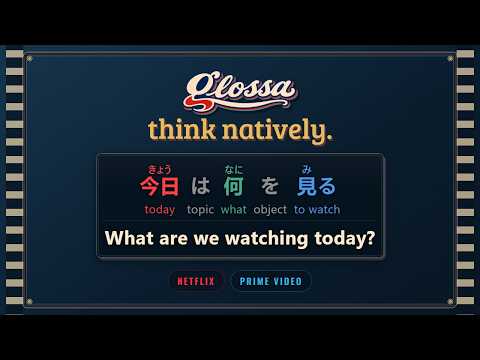
Turn your next episode into language practice. glossa shows Netflix and Prime Video with two subtitle languages at once, lets you shape the subtitles to your screen and taste, and lets you replay dialogue at your own pace. FREE • Dual subtitles: your learning language and a language you know, on screen together. • 10 languages: English, French, Japanese, Spanish, German, Korean, Italian, Chinese, Portuguese and Hindi. • Compatibility badges while you browse, so you never start a title only to find it isn't supported. • Line navigation: jump to the previous or next line with the toolbar or the J and L keys. • Translation practice: show, blur or hide the translation, and hover a blurred line to peek. • Adjustable subtitles: drag, resize, change the text size, background opacity and subtitle colors, or reset the position. SUPPORTER BETA • A meaning under every word: interlinear English glosses in 8 languages (Japanese, Korean, Chinese, French, Spanish, German, Italian and Portuguese). • Context-aware meanings: No more guessing which of twelve dictionary senses was meant. • Reading aids: Japanese furigana and romaji, Chinese pinyin and Korean romanization. • Recall practice: show, blur or hide the reading aids and gloss lines. • Hover any word for its dictionary entry, alternative meanings and, when available, its components. • Click words to mark them as known, with optional gold highlights when they come back. • Your known words sync across browsers and devices. • Anki export: download your saved words with English definitions, in every glossed language. • One-time purchase. No subscription. GET STARTED Sign in, choose your learning and known languages, and open Netflix or Prime Video. Subtitle availability varies by title, region and platform. Streaming subscriptions are not included. Beta features may change. glossa is an independent extension and is not affiliated with Netflix, Amazon or Anki.

Details

  • Version
    0.2.4
  • Updated
    October 22, 2026
  • Features
    Offers in-app purchases
  • Size
    1.48MiB
  • Languages
    English
  • Developer
    Website
    Email
    contact@norvalys.com
  • Non-trader
    This developer has not identified itself as a trader. For consumers in the European Union, please note that consumer rights do not apply to contracts between you and this developer.

Privacy

Manage extensions and learn how they're being used in your organization

glossa: learn while watching Netflix and Prime Video has disclosed the following information regarding the collection and usage of your data. More detailed information can be found in the developer's privacy policy.

glossa: learn while watching Netflix and Prime Video handles the following:

Personally identifiable information
Website content

This developer declares that your data is

  • Not being sold to third parties, outside of the approved use cases
  • Not being used or transferred for purposes that are unrelated to the item's core functionality
  • Not being used or transferred to determine creditworthiness or for lending purposes

Related

Sluka

5.0

Read any page with new words lit up. Hover for the meaning. Your vocabulary stays on this computer.

SubPair — Dual Subtitles for Netflix, YouTube & Disney+

0.0

Two subtitle lines at once: the original and your language. Click any word for its meaning, save it with the scene, review it later.

Inkah: Chinese & Korean Pop-up Dictionary

4.9

Look up Korean & Chinese words while browsing the web. Hover over characters to see definitions, save words, and more.

RealTalk: learn English from what you watch

0.0

Click any word in YouTube and Netflix subtitles to see what it means there, save phrases with their scene, and say them for real.

FlixFluent - Dual Subtitles & Language Learning for Netflix & YouTube

5.0

Learn languages on Netflix & YouTube: dual subtitles, hover translation, click-to-explain grammar, and spaced-repetition flashcards.

Yanwai: Dual Subtitles for Netflix & YouTube

0.0

Bilingual subtitles for Netflix and YouTube. Click any word to learn it; keep it as a flashcard with its scene.

Dual Subtitles Plus - YouTube & Netflix

0.0

Dual subtitles for YouTube and Netflix. Translation on top, original below. Customize colors, position, and remember your languages.

Linglass — Dual Subtitles for YouTube & Netflix

4.8

Learn languages on YouTube, Netflix, Viki & iQIYI. Dual subtitles, click any word to translate, save words as flashcards.

YouTube Transcript, Summary, AI Chatbot - SubKun

4.7

Get clean YouTube transcripts, AI summaries, and chat with any video. Smart segmentation makes them readable, not raw captions.

Voccle - YouTube Word Capture

0.0

Highlight any word on YouTube subtitles to instantly see its meaning and save it as a flashcard to your Voccle deck.

Telidioma: Interactive YouTube Subtitles

5.0

Learn languages on YouTube and Netflix: click a word in the subtitles and see the translation and definition instantly.

Learn while watching: Word-by-Word Subtitles

0.0

Translate YouTube subtitles into your language with a per-word gloss under each word, so you learn while you watch.

Sluka

5.0

Read any page with new words lit up. Hover for the meaning. Your vocabulary stays on this computer.

SubPair — Dual Subtitles for Netflix, YouTube & Disney+

0.0

Two subtitle lines at once: the original and your language. Click any word for its meaning, save it with the scene, review it later.

Inkah: Chinese & Korean Pop-up Dictionary

4.9

Look up Korean & Chinese words while browsing the web. Hover over characters to see definitions, save words, and more.

RealTalk: learn English from what you watch

0.0

Click any word in YouTube and Netflix subtitles to see what it means there, save phrases with their scene, and say them for real.

FlixFluent - Dual Subtitles & Language Learning for Netflix & YouTube

5.0

Learn languages on Netflix & YouTube: dual subtitles, hover translation, click-to-explain grammar, and spaced-repetition flashcards.

Yanwai: Dual Subtitles for Netflix & YouTube

0.0

Bilingual subtitles for Netflix and YouTube. Click any word to learn it; keep it as a flashcard with its scene.

Dual Subtitles Plus - YouTube & Netflix

0.0

Dual subtitles for YouTube and Netflix. Translation on top, original below. Customize colors, position, and remember your languages.

Linglass — Dual Subtitles for YouTube & Netflix

4.8

Learn languages on YouTube, Netflix, Viki & iQIYI. Dual subtitles, click any word to translate, save words as flashcards.

Search
Clear search
Close search
Google apps
Main menu