Item logo image for Gloss

Gloss

5.0(

1 rating

)
Item media 6 (screenshot) for Gloss
Item video thumbnail
Item media 2 (screenshot) for Gloss
Item media 3 (screenshot) for Gloss
Item media 4 (screenshot) for Gloss
Item media 5 (screenshot) for Gloss
Item media 6 (screenshot) for Gloss
Item video thumbnail
Item media 2 (screenshot) for Gloss
Item media 3 (screenshot) for Gloss
Item media 4 (screenshot) for Gloss
Item media 5 (screenshot) for Gloss
Item media 6 (screenshot) for Gloss

Overview

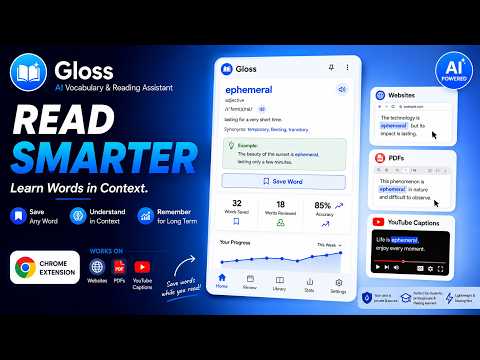
Look up any word in context while you read, and sync it with your Gloss library.

Gloss lets you look up any word or phrase without leaving the page you're reading. Select text on any webpage, in a PDF (including PDFs opened directly or ones rendered by an in-page viewer like arXiv's "View PDF"), or double-click a word in a YouTube video's captions, and Gloss shows a clear, context-aware definition right there, built from the exact sentence you selected it from. Save what you learn and it syncs straight into your Gloss library at usegloss.app, ready for spaced-repetition review sessions that actually help words stick. Key features: - Instant lookup: select any word or phrase on a webpage or PDF, or double-click a caption while watching a YouTube video - Context-aware definitions built from the sentence you selected, not a generic dictionary entry - Built-in PDF reader for direct .pdf links, since Chrome doesn't allow extensions to run inside its own built-in viewer - One-click save into your personal Gloss vocabulary library - Daily streak and progress tracking from the toolbar popup - Works across regular webpages, in-page PDF viewers, direct PDF links, and YouTube captions Gloss requires a free account at usegloss.app to save words and track progress. Looking up definitions works without signing in. Only the word or phrase you actively select, plus its surrounding sentence, is ever sent to fetch a definition. Nothing is scraped or tracked in the background.

Details

  • Version
    0.1.0
  • Updated
    August 3, 2026
  • Size
    2.56MiB
  • Languages
    English
  • Developer
    Website
    Email
    anishaman6206@gmail.com
  • Non-trader
    This developer has not identified itself as a trader. For consumers in the European Union, please note that consumer rights do not apply to contracts between you and this developer.

Privacy

Manage extensions and learn how they're being used in your organization

Gloss has disclosed the following information regarding the collection and usage of your data. More detailed information can be found in the developer's privacy policy.

Gloss handles the following:

Website content

This developer declares that your data is

  • Not being sold to third parties, outside of the approved use cases
  • Not being used or transferred for purposes that are unrelated to the item's core functionality
  • Not being used or transferred to determine creditworthiness or for lending purposes

Support

For help with questions, suggestions, or problems, visit the developer's support site

Related

Dictionary to Notion

5.0

Look up any word with a simple double click and sync to Notion.

1913 Classic Dictionary - Offline Lookup

0.0

Rich literary definitions from the 1913 classic dictionary. Instant lookup while reading - offline and private. 113K+ words.

InlineVocab - Learn Language While Reading

0.0

Build vocabulary while reading real webpages. Track words you want to learn and see them translated inline when they appear again.

Climb

4.4

Look up the definition for any word on the page. Save it to your library to memorize it later.

Rainbow English: Tap-to-Define, Translate & Syllable/Syntax Highlighting

5.0

Translate and define words by clicking. Boost reading using color-coded highlights for syllables & sentence structures.

WhichKanji - Japanese Text Capture

5.0

Capture Japanese text from any screen using OCR. Get readings, meanings & save words to cloud-synced vocabulary lists.

VocaLearn – Sentence Miner

0.0

Capture vocabulary in context from any web page and save it to your Vocabulary Journal account.

Lexigo: AI Dictionary, Vocabulary Builder & Save Words

5.0

Save words as you read — definitions, audio & AI explanations in your language — then remember them with spaced repetition.

Stickly - translate & learn

5.0

Learn vocabulary from the articles you already read. Translate, save, and review words in context.

Skimmify: Advanced CTRL F - Proximity Search and Highlight Multiple Words

5.0

Effortlessly skim pages and PDFs. Highlight and search cluster of words.

Read Aloud Voice Reader: Text to Speech (TTS) + Save Later | Alexandria

4.1

Read aloud any webpage with word-by-word highlighting. Highlight, annotate & save to your library. Stay focused, remember more.

Vocards – Kindle Highlights to Flashcards

0.0

Turn your Kindle and Google Play Books highlights into vocabulary flashcards – plus quick-add any word as you read the web.

Dictionary to Notion

5.0

Look up any word with a simple double click and sync to Notion.

1913 Classic Dictionary - Offline Lookup

0.0

Rich literary definitions from the 1913 classic dictionary. Instant lookup while reading - offline and private. 113K+ words.

InlineVocab - Learn Language While Reading

0.0

Build vocabulary while reading real webpages. Track words you want to learn and see them translated inline when they appear again.

Climb

4.4

Look up the definition for any word on the page. Save it to your library to memorize it later.

Rainbow English: Tap-to-Define, Translate & Syllable/Syntax Highlighting

5.0

Translate and define words by clicking. Boost reading using color-coded highlights for syllables & sentence structures.

WhichKanji - Japanese Text Capture

5.0

Capture Japanese text from any screen using OCR. Get readings, meanings & save words to cloud-synced vocabulary lists.

VocaLearn – Sentence Miner

0.0

Capture vocabulary in context from any web page and save it to your Vocabulary Journal account.

Lexigo: AI Dictionary, Vocabulary Builder & Save Words

5.0

Save words as you read — definitions, audio & AI explanations in your language — then remember them with spaced repetition.

Google apps