


Overview
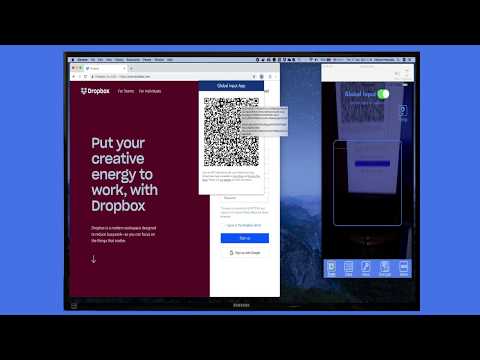
Use your mobile to operate on web pages in your computer browser to login, subscribe, encrypt, or control any element in the page.
Sign in to websites from your phone. Open the Global Input side panel, scan once, and every sign-in page asks your phone for the saved account: choose it, and the page is filled and submitted. If your phone drops the connection, it comes back from the app's History without scanning again. Works with two-step sign-ins, sends one-time codes from your phone, and keeps encryption, form transfer and page control in the same panel. Everything travels end-to-end encrypted between your phone and your browser. Global Input App Extension makes your mobile device a secure and smart controller for your Chrome browser. This tool enables interaction with any web page element from your mobile device, streamlining tasks like login, form filling, and web navigation. The extension allows you to interact with any web element from your mobile device, automating tasks like login and form completion. Information can be securely stored on your mobile device, transferring to your browser only when needed through end-to-end encryption and also with the ability to create Encrypted QR codes. You can create custom rules to identify and interact with specific page elements. The extension allows you to encrypt content on your mobile device before sending it to web storage services, ensuring your data remains protected and accessible only through your mobile app. As an open-source solution, you can integrate these capabilities directly into your own applications using our publicly available source code, enabling seamless mobile interoperability features. New in 5.3.0: scan once and stay connected. When your phone drops the connection, the panel waits for it instead of showing the QR code again, and your phone comes back by tapping the session in the app's History, even after you close and reopen the panel. Only the phone that connected before can come back. Press Reset in the panel, or End session on your phone, to start a new connection with a new QR code. There is no automatic disconnect any more, and the session ends when you quit the browser.
5 out of 53 ratings
Details
- Version5.3.0
- UpdatedNovember 14, 2026
- Size263KiB
- LanguagesEnglish
- DeveloperDilshat HewzullaWebsite
39 Aberdale Gardens Potters Bar EN6 2JW GBEmail
dilshat@iterativesolution.co.ukPhone
+44 7932 550780 - TraderThis developer has identified itself as a trader per the definition from the European Union and committed to only offer products or services that comply with EU laws.
Privacy

Global Input App has disclosed the following information regarding the collection and usage of your data. More detailed information can be found in the developer's privacy policy.
Global Input App handles the following:
This developer declares that your data is
- Not being sold to third parties, outside of the approved use cases
- Not being used or transferred for purposes that are unrelated to the item's core functionality
- Not being used or transferred to determine creditworthiness or for lending purposes
Support
For help with questions, suggestions, or problems, please open this page on your desktop browser