

ChatPilot – ChatGPT Bulk Delete, Archive & Timestamps

Overview
Bulk delete & archive ChatGPT chats, add message timestamps and navigate conversations fast. Clean up ChatGPT in one click.
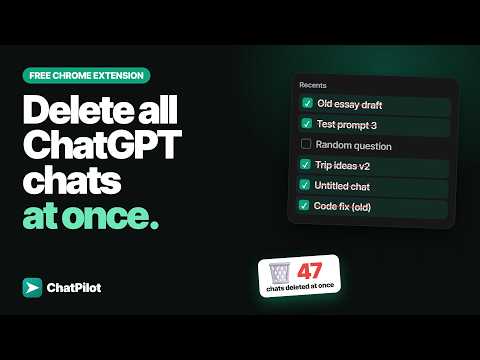
Clean up a year of conversations in a couple of minutes. ChatPilot is a Chrome extension that adds the bulk tools the sidebar is missing: checkboxes on every thread, a floating action bar, and one click to delete or archive everything you selected. HOW IT WORKS 1. Open chatgpt.com and press Add Checkboxes. 2. Click the threads you want. Shift-click picks a whole range; one button selects them all. 3. Choose Delete Selected or Archive Selected — and watch it run. A progress bar shows how many are done out of how many, each row spins while it is being handled and slides away when it is finished, and a Stop button ends the run whenever you want. No silent waiting, no guessing whether it froze. WHAT ELSE IS INSIDE • Bulk delete — clear out old threads in one run instead of one menu at a time • Bulk archive — tidy the sidebar without losing anything you might want later • Message timestamps — see the date and time under every message, so you can tell when something was actually said • Quick navigation — jump between your own messages, or straight to the top or bottom of a very long thread • Light and dark theme that follows the page • Interface in 55 languages PRIVACY Nothing leaves your browser. The extension does not read, collect, store or send the content of your chats — it only acts on the threads you tick. Signing in with Google is used for nothing but identifying your account. ChatPilot is an independent project. It is not affiliated with, endorsed by, sponsored by or otherwise connected to OpenAI, and ChatGPT is a trademark of OpenAI.
5 out of 55 ratings
Details
- Version1.0.5
- UpdatedOctober 9, 2026
- Size1.83MiB
- Languages55 languages
- DeveloperWebsite
Email
contact@addonschrome.com - Non-traderThis developer has not identified itself as a trader. For consumers in the European Union, please note that consumer rights do not apply to contracts between you and this developer.
Privacy

ChatPilot – ChatGPT Bulk Delete, Archive & Timestamps has disclosed the following information regarding the collection and usage of your data. More detailed information can be found in the developer's privacy policy.
ChatPilot – ChatGPT Bulk Delete, Archive & Timestamps handles the following:
This developer declares that your data is
- Not being sold to third parties, outside of the approved use cases
- Not being used or transferred for purposes that are unrelated to the item's core functionality
- Not being used or transferred to determine creditworthiness or for lending purposes
Support
For help with questions, suggestions, or problems, visit the developer's support site