

Glitches: Report visual issues without the hassle

Overview
Send visual bug reports to GitHub, Jira or Productive with screenshots, screen recordings, annotations and AI auto-fix.
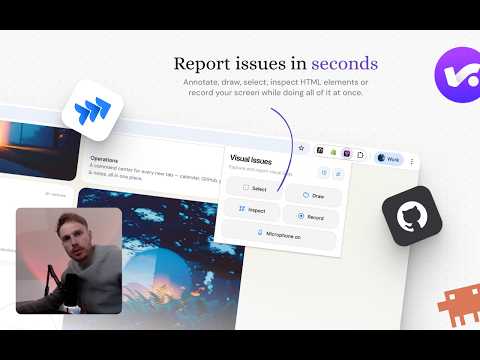
Send visual bug reports straight to GitHub, Jira, or Productive with screenshots, screen recordings, annotations, and AI-powered auto-fixes. No separate bug tracker, no copy-paste handoffs. Issues land in your real workflow with full browser context attached. 📸 Capture any visual issue Screenshot any region and annotate with freehand drawing, straight lines, arrows, text callouts, and pasted images. Record your screen with optional microphone narration, toggle the mic on or off mid-recording. Use the DOM Inspector to grab the exact element behind a bug — HTML, selectors, computed dimensions, the lot. 🧭 Automatic context with every report Browser, OS, viewport, color scheme, device info, URL, console errors, and network failures travel with every report. Shopify stores are detected automatically — shop name, theme, and template are attached, with a deep link to the relevant spot in Shopify admin. No more "what browser are you on?" 🔌 Three first-class destinations • GitHub — issues created directly in your repo with labels, assignees, and a target branch. Videos play inline on GitHub, no downloads. See every report filed on the current page right in the side panel. • Jira — create issues or comment on existing tickets in any of your projects. Personal API token or full Atlassian OAuth — your call. • Productive — file tasks against the right project, task list, and assignee, with screenshots attached as Productive files. Pick one or fan out to all three at the same time. Each destination renders the report in its native format. ✨ Auto-fix with Claude Code Flip one toggle on submit and Claude reads the annotated screenshot, the DOM snapshot, the console errors, and the rest of your repo, then pushes a branch with a proposed fix and opens a pull request for review. Powered by a GitHub Action using your own Anthropic API key. Nothing is stored on our servers. 🛠️ Four purpose-built tools Select to outline a region, Canvas to draw and mark up, Inspect to pick a DOM element, Record for motion captures. Keyboard shortcuts for everything: D to draw, V for pointer, S to select, C to comment, Shift for straight lines. Paste reference images straight from your clipboard. 👥 Built for teams and client work Workspaces let teams share repo lists, Jira sites, and Productive setups so a new teammate is productive in minutes instead of an hour of token-pasting. Admins manage members and roles from the workspace dashboard. Per-account credential isolation means signing in as a different user on the same Chrome profile gives you a clean slate — no leakage between accounts. Perfect for agencies juggling multiple client repos. 🎨 White-label for agencies Custom themes rebrand the side panel, overlay, and capture UI with your own colors and logo so the tool feels native to your stack. Hand it to clients without ever showing the Glitches name. Unlocked with an activation code — contact us for agency pricing. 🔒 Privacy-first Tokens are stored locally on your device. Screenshots and recordings go exclusively to your own GitHub / Jira / Productive workspace. No third-party analytics, no tracking, nothing on our servers besides the workspace metadata teams opt into. 🎯 Who is it for? Developers, designers, QA testers, PMs, agencies, and the clients they work with — anyone tired of vague bug reports who wants to close the loop between "this looks broken" and a merged pull request. Free to start. Connect a token and go.
5 out of 513 ratings
Details
- Version1.3.14
- UpdatedMay 5, 2026
- FeaturesOffers in-app purchases
- Size1.41MiB
- LanguagesEnglish
- DeveloperStudio N.O.P.E.Website
Noord-Bevelandstraat 27 Amsterdam 1025NP NLEmail
helloworld@studionope.nlPhone
+31 6 50893677 - TraderThis developer has identified itself as a trader per the definition from the European Union and committed to only offer products or services that comply with EU laws.
- D-U-N-S494963363
Privacy

Glitches: Report visual issues without the hassle has disclosed the following information regarding the collection and usage of your data. More detailed information can be found in the developer's privacy policy.
Glitches: Report visual issues without the hassle handles the following:
This developer declares that your data is
- Not being sold to third parties, outside of the approved use cases
- Not being used or transferred for purposes that are unrelated to the item's core functionality
- Not being used or transferred to determine creditworthiness or for lending purposes
Support
For help with questions, suggestions, or problems, please open this page on your desktop browser