

Glide
2 ratings
)
Overview
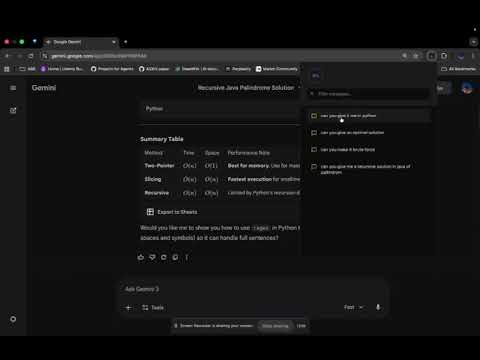
Track and navigate your AI chat conversations across Claude, ChatGPT, and Gemini
Glide - AI Chat History Tracker Never lose track of your conversations again! Glide helps you navigate through long AI chat conversations with ease. ✨ Key Features: - Automatic message tracking across multiple AI platforms - Visual progress indicator showing your position in the conversation - Click any message to jump directly to it in the chat - Search through your conversation history - Real-time synchronization as you scroll 🤖 Supported Platforms: - Claude.ai - ChatGPT - Google Gemini 📱 How It Works: 1. Install the extension 2. Visit any supported AI chat platform 3. Click the extension icon to see all your messages 4. Click any message card to jump to that point in the conversation 5. Use the circular progress indicator to see where you are Perfect for: - Long brainstorming sessions - Technical discussions - Research conversations - Code debugging sessions - Any lengthy AI chat interaction Privacy First: - All data stored locally on your device - No data sent to external servers - No account required
5 out of 52 ratings
Details
- Version1.0.4
- UpdatedDecember 30, 2025
- Size33.23KiB
- LanguagesEnglish
- Developer
Email
rishipolaie09@gmail.com - Non-traderThis developer has not identified itself as a trader. For consumers in the European Union, please note that consumer rights do not apply to contracts between you and this developer.
Privacy

Glide has disclosed the following information regarding the collection and usage of your data. More detailed information can be found in the developer's privacy policy.
Glide handles the following:
This developer declares that your data is
- Not being sold to third parties, outside of the approved use cases
- Not being used or transferred for purposes that are unrelated to the item's core functionality
- Not being used or transferred to determine creditworthiness or for lending purposes